The Scenario
Two disk images were recovered from a suspect workstation after the attack timeline established in Challenges 01–03. The images were handed to forensic analysis to determine what data was stolen, whether anti-forensics were attempted, and what the attacker was planning next.
Endpoint logs tell you what commands ran. Network traffic tells you what left the wire. Disk forensics tells you what the attacker touched, hid, and tried to destroy.
| File | Size | Description |
|---|---|---|
suspicious.dd | 32 MB | USB drive image recovered from the suspect workstation |
deleted-files.img | 16 MB | Disk image containing deliberately deleted files |
Tools Used
| Tool | Purpose |
|---|---|
mount | Mount disk images read-only for filesystem traversal |
ls -laR | Recursive listing including hidden files and directories |
cat | Read script and file contents from mounted image |
foremost | File carving to recover image files from raw disk sectors |
base64 | Encode binary files for transfer from headless lab environment |
strings | Extract human-readable content from raw disk images |
Approach
The first task was to find evidence of data theft on the USB image. Mounting the image read-only and performing a recursive listing was the starting point. A standard ls would miss hidden directories. The -a flag is required to reveal entries prefixed with a dot.
The image was mounted to /mnt and a recursive listing with all flags was run. A hidden directory .secret was discovered inside /mnt/documents/, invisible without the -a flag. Inside it was stolen-data.csv.


sudo mount -o ro,loop suspicious.dd /mnt
ls -laR /mnt
/mnt/documents/.secret:
total 12
drwxr-xr-x 2 root root 4096 Nov 10 03:30 .
drwxr-xr-x 3 root root 4096 Nov 10 03:28 ..
-rw-r--r-- 1 root root 512 Nov 10 03:30 stolen-data.csv-a and a recursive flag to ensure nothing is missed.
/documents/.secret/stolen-data.csv
Approach
The recursive listing from Flag 4.1 also revealed a script at /mnt/tmp/cleanup.sh. Reading it exposed the attacker's anti-forensics technique: a shred command targeting /var/log/* to destroy all log files and eliminate evidence of the intrusion.
shred overwrites a file multiple times before deletion, making recovery significantly harder than a standard rm. The use of a glob pattern * shows the attacker intended to wipe the entire log directory, not individual files.


cat /mnt/tmp/cleanup.sh#!/bin/bash
# Cleanup script - remove evidence
shred -uzn 3 /var/log/*
echo "Cleanup complete"shred -uzn 3 overwrites each file 3 times with random data, then zeros, then deletes it. The -z flag adds a final zero-overwrite pass to hide the shredding. This is a deliberate anti-forensics step, not an accidental deletion.
/var/log/*
Approach
File carving recovers files from raw disk sectors using known file format headers and footers. It does not rely on the filesystem's directory structure. This makes it effective against deleted files and images stored in unallocated space. foremost was used to carve PNG, JPG, BMP, and GIF files from the USB image.
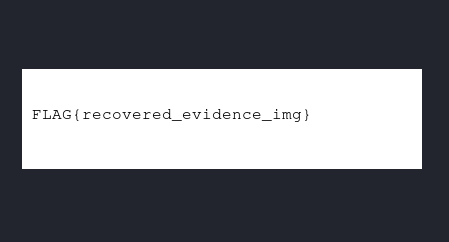
A PNG was successfully carved at /tmp/carved-sus/png/00012416.png. The lab environment had no GUI or X server, so the image could not be opened directly. The solution was to base64-encode the binary on the remote machine, transfer the output, and decode it locally on the Kali machine to reveal the flag inside the image.


# Carve image files from the disk image
foremost -t png,jpg,bmp,gif -i suspicious.dd -o /tmp/carved-sus

# Check carved output
ls -laR /tmp/carved-sus

# Encode the carved PNG for transfer (no GUI available)
base64 /tmp/carved-sus/png/00012416.png
Processing: suspicious.dd
|------------------------------------------------------------------
File: suspicious.dd
Start: Sun Nov 10 03:45:00 2025
Length: 32 MB (33554432 bytes)
Num Name (bs=512) Size File Offset Comment
0: 00012416.png 6 KB 6356992# On local Kali machine: decode without invalid input errors
cat > /tmp/flag.b64 << 'EOF'
<base64 output here>
EOF
base64 -d /tmp/flag.b64 > ~/04-4_3-recovered-img.png
xdg-open ~/04-4_3-recovered-img.png\x89PNG\r\n\x1a\n. Foremost uses these signatures to locate and extract files even when the filesystem metadata has been wiped. Base64 is a reliable way to move binary files out of restricted environments.
recovered_evidence_img
Approach
Moving to the second image, deleted-files.img contained files that had been deliberately removed. Deleting a file removes the filesystem entry pointing to it, but the raw data on disk remains intact until the sectors are overwritten by new data. strings reads raw bytes directly from the image and prints sequences of printable characters, bypassing the filesystem entirely.
Filtering the output for credential-related keywords recovered the contents of a deleted creds.txt file, showing admin:FLAG{deleted_but_not_gone}.


strings deleted-files.img | grep -i "pass\|admin\|user\|cred"creds.txt
admin:FLAG{deleted_but_not_gone}
Password stored for lateral movementstrings on a raw image can recover data that the filesystem reports as gone.
deleted_but_not_gone
Approach
The same strings technique recovered a second deleted file: plan.txt, labelled OPERATION NIGHTFALL - CONFIDENTIAL. The plan detailed the attacker's exfiltration schedule: the data theft was set for 2025-11-15 02:00 UTC via a DNS tunnel, targeting the customer database and financial records.
This corroborates the DNS exfiltration technique identified in Challenge 03, where base64-encoded subdomain queries were used to covertly move data out of the network.


strings deleted-files.img | grep -i -A5 -B5 "exfil\|2025\|midnight\|transfer\|send"OPERATION NIGHTFALL - CONFIDENTIAL
Exfiltration scheduled: 2025-11-15 02:00 UTC
Method: DNS tunnel via evil-c2.example.com
Targets: customer database, financial records
Status: READYevil-c2.example.com domain identified in Challenge 03. Across four challenges, the same attacker infrastructure (C2 IP, domain, and exfiltration technique) has now appeared in endpoint logs, memory, network traffic, and disk artifacts.
2025-11-15 02:00 UTC
Challenges Faced
- No GUI or X server in the lab environment, so direct image viewing was not possible. Base64 encoding was the workaround to transfer the carved PNG to a local machine.
- Foremost initially appeared to hang during carving. Large image scans take time; the fix was to wait and check the audit log rather than kill the process.
- Mounting the disk image did not surface deleted files. The filesystem had no record of them. Switching to raw disk analysis with
stringsbypassed the filesystem entirely.
Key Takeaways
- Hidden files require
-aand recursive listing. A standardlswill miss anything prefixed with a dot. - Deleting a file does not erase it. Until sectors are overwritten, the raw data is fully recoverable with
stringsor a carving tool. - File carving works independently of the filesystem. Magic bytes let tools like
foremostrecover files even after the filesystem metadata has been destroyed. - Anti-forensics attempts leave their own evidence. A
shredscript on disk tells you the attacker knew they were leaving traces and tried to clean up. - Base64 is a reliable way to move binary artifacts out of restricted, headless lab environments without corrupting the data.
- The same attacker infrastructure appears across all four challenges. Disk, memory, network, and log evidence consistently point to the same C2 IP, domain, and exfiltration method.